


You don’t wake up one day and casually switch ecommerce platforms. If you’re planning a Shopify migration, it usually means your current store is slowing you down, costing you money, or both.
This playbook is for founders who want a clean move, no lost orders, no broken customer accounts, and no surprise traffic drop. It’s the same approach we use to keep launches calm and predictable.
Is it time to move to Shopify?
Most founders start looking at Shopify when their current setup stops feeling like a store and starts feeling like a second job.
We see this a lot with WooCommerce sites that have grown into a complex bundle of plugins and custom fixes. We also see it with older Magento builds that need constant maintenance. Sometimes it’s a custom platform that made sense early on, then got expensive to keep alive.
If you’re still deciding, start with these questions to ask before migrating. It helps you confirm you’re solving the right problem.
The problems a migration should fix
A platform change is only worth it if it removes real friction. Here are the common ones:
- Integration headaches: Every new tool needs developer time, and it never feels “done.”
- Security stress: Patches, plugin updates, and constant worry pull focus from growth.
- Checkout drop-off: Slow pages and awkward steps can kill conversions fast. With cart abandonment often hovering around 70%, checkout friction is expensive.
- Slow experiments: Simple tests, new landing pages, and promotions take too long to ship.
A migration is not about copying your old store. It’s about removing the bottlenecks that stopped you from shipping, testing, and improving week to week.
Why Shopify is often the next step
Shopify tends to win because it lowers the day-to-day load. Hosting, security basics, and core ecommerce features are handled. That gives your team time back.
The app ecosystem also changes how fast you can add features. Instead of custom-building everything, you can start with proven tools, then customize only what needs it.
Planning the move: what founders often miss
Most migration mistakes happen before any data is moved. The biggest issue is rushing into build mode without agreeing on scope, priorities, and success metrics.
Planning is where you decide what must come over, what can be rebuilt, and what should be dropped. It’s also where you protect your traffic, because SEO work starts early, not at the end.
Audit your data and your app stack
Start with three data buckets. If these are messy, everything downstream gets harder:
- Product data: SKUs, titles, descriptions, images, variants, pricing, inventory, collections, and any custom fields.
- Customer data: Profiles, addresses, tags, and marketing permissions.
- Order history: Past orders, refunds, discounts, and fulfillment status.
Next, list every app, plugin, and custom feature your store depends on today. Many teams find a large chunk of their stack is redundant after moving platforms. That is a good thing. Fewer tools usually means fewer failures.
- Must-have: If this breaks, you can’t operate.
- Important: It matters, but you can likely replace it with Shopify-native features or a standard app.
- Drop it: It’s legacy, unused, or not worth rebuilding.
Platform changes are rare “clean the garage” moments. If you bring every old tool and workaround with you, you will recreate the same problems on a new system.
Map workflows, not just pages
Founders often focus on the storefront and forget operations. Document what happens after a sale:
- How orders get routed and fulfilled
- How refunds and exchanges work
- How customer support finds order details
- How subscriptions, bundles, or wholesale orders are handled
Your goal is to keep the business running the same day you switch the domain.
Set a real budget and timeline
Scope creep is what turns a reasonable plan into a never-ending rebuild. The fix is simple: decide what “launch” includes, then create a second list for “phase two.”
Here’s a realistic timeline estimate based on store complexity:
Shopify migration timeline estimator
| Store complexity | Typical timeline | Key considerations |
|---|---|---|
| Small store | 4–8 weeks | Under 500 products, minimal integrations, standard theme. |
| Medium store | 8–16 weeks | 500–5,000 products, custom fields, several key apps. |
| Large / complex store | 4–6+ months | Complex catalogs, B2B, custom integrations, or headless front end. |
If you need help scoping effort before you commit, our ecommerce migration services page breaks down what a low-risk approach looks like.
Moving data and design without surprises
Once you have a plan, the work splits into two tracks. One is data and functionality. The other is the customer experience and design.
The goal is a store that feels familiar to returning customers, but runs cleaner for your team.
Data migration: app, script, or hybrid
For small stores with simple data, migration apps can work. For bigger catalogs, custom fields, or long order history, scripts are usually safer. They let you control mapping, validation, and retries.
Don’t assume fields match across platforms. They rarely do. Even small differences, like how variants or address fields are stored, can create support issues later.
One common win is cleaning data during the move. If customer notes, tags, or product fields are messy today, a custom migration can reshape them into something your team can actually use.
Design choices: theme, customized theme, or custom build
You have three main paths:
- Pre-built theme: Fast and cost-effective. Best for simpler needs and tight timelines.
- Customized theme: A strong middle option. You start with a solid base and adjust layout, sections, and key templates.
- Custom build: Best when you need full control or complex UX. Higher cost and more build time.
Whichever route you choose, treat mobile as the default. Most stores see the majority of traffic on mobile, and small design mistakes show up there first.
Replacing key features the right way
Most stores have “special” parts: bundles, subscriptions, wholesale pricing, custom shipping rules, or special post-purchase flows.
Start by asking, “What business result does this feature create?” Then find the simplest Shopify-friendly way to get that result. That could be native Shopify features, a trusted app, or a small private app.
If you need engineering help for custom work, this is where an experienced website development team matters. Migrations are mostly detail work, and details are where revenue gets lost.
Protect your rankings during the move
A platform change can erase years of search traffic if you treat SEO as an afterthought. The fix is not mysterious. It is careful URL mapping, clean redirects, and solid testing.
Think of every ranking page as a door customers use to find you. If you change the door without leaving a sign, customers stop showing up.
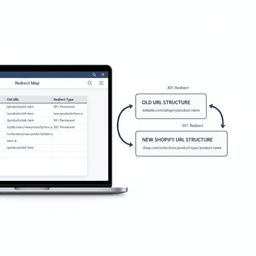
The most important SEO task: 301 redirects
A 301 redirect tells Google and browsers that a page moved permanently.
If an old URL returns a 404, Google will eventually drop it. That can wipe out traffic to product pages, collections, and blog posts that used to drive steady revenue.
If you only do one SEO task during a migration, do redirects. Everything else is secondary.
Build a redirect map before you launch
Your redirect map is a simple spreadsheet with two columns: old URL and new URL. Build it early, then validate it again right before launch.
- Crawl your current site: Tools like Screaming Frog help you collect URLs at scale.
- Prioritize high-value pages: Use analytics and search data to find the pages that drive the most traffic and sales.
- Redirect one-to-one: Old product pages should go to the new product pages, not the homepage.
- Handle structure changes: Document how categories, products, and collections will change in the new URL format.
Carry over on-page SEO basics
Redirects are step one. Step two is making sure each important page keeps the same core signals:
- Title tags
- Meta descriptions
- H1 tags
- Image alt text
You can improve these later, but don’t lose them during the move. If you want ongoing help improving speed and technical health after launch, our site performance and SEO support service is built for that.
Pre-launch checklist and go-live plan
A good launch feels boring. That is the point.
Your job is to test every path a customer can take, then write a runbook so launch day is a checklist, not a scramble.
Pre-launch testing to run every time
- Full checkout testing: Run test orders, discounts, shipping rates, and abandoned cart flows.
- Redirect testing: Crawl your old URL list and verify every redirect goes to the right page.
- Customer account checks: Confirm login behavior, addresses, and visible order history.
- App checks: Verify reviews, loyalty, subscriptions, tracking, and email flows.
If you want a deeper launch workflow, this launch day checklist is a strong reference for DNS cutover and post-launch checks.
Create a go-live runbook
A runbook is a timed list of who does what, and when. It keeps the team aligned and reduces mistakes.
- Put the old site in maintenance mode: Stop new orders on the old platform.
- Run a final data sync: Migrate new orders and customers since the last import.
- Point your domain: Update DNS to route traffic to Shopify.
- Run post-launch checks: Place a real order, confirm tracking, and spot-check redirects.
Common questions founders ask
How long does a Shopify migration take?
It depends on catalog size, data quality, and how much custom work is needed. Small stores can move in 4–8 weeks. Complex stores often take 3–6 months.
The planning phase is what turns “it depends” into a schedule you can trust.
Will we lose sales data or customer history?
You should not, as long as the migration is planned and tested. Orders, customers, and product data are all transferable. The work is in correct mapping, validation, and a final sync before launch.
The biggest risks are data mistakes, redirect mistakes, and workflow surprises. A tight plan and repeatable testing reduce all three.
Can we do it ourselves with an app?
If you are early-stage with minimal history, maybe. If you have meaningful revenue, complex data, or SEO traffic you depend on, it’s risky.
Many teams end up paying twice, once for the quick move, then again to fix what broke.
Next steps
If you’re serious about moving, keep it simple. Decide what must be preserved, what can improve, and what you are willing to leave behind.
- Audit your current store: list data, apps, and workflows you rely on.
- Define launch scope: set “must-have” vs “phase two.”
- Plan for SEO: start your redirect map early.
If you want a broader view of migration risks and planning, this website migration services guide gives a solid framework.
When you’re ready to get a real plan and timeline, talk with our team. We’ll help you map the move, protect revenue, and launch without surprises.


