


You’re days from launch. The site looks great. Payments work. Signup flows feel smooth.
Then I ask the question most founders hate: “Have you done a security audit?”
Because the truth is simple. A security issue on day one is not “bad luck.” It’s usually an old plugin, a rushed integration, or a setting nobody checked. Skipping a security audit of websites is not moving fast, it’s betting your launch on hope.
Before we get into tests and checklists, it helps to understand what a normal website audit includes versus what security testing adds. If you want that bigger picture, start with what a website audit covers.
What’s really at stake?
Think of a security audit like an inspection before you open a new storefront. You’re checking doors, windows, alarms, and the back room. You want problems found by you, not by someone trying to steal.
A strong audit looks at your site’s code, plugins, integrations, and server setup before attackers do. It also checks the “hidden” parts founders forget, like admin panels, APIs, and third-party access.
The main parts of a security audit
Not every audit includes every item below. But these are the big building blocks, and knowing the difference helps you buy the right level of testing.
| Audit type | What it is | Why it matters |
|---|---|---|
| Automated scan | Tools scan your site for known issues, like outdated software and common misconfigurations. | Fast and affordable. Catches issues bots exploit every day. |
| Manual penetration test | An ethical hacker tries to break in using real attacker methods. | Finds business-logic flaws and chained exploits scanners miss. |
| Source code review | A person reads your code to find security bugs before they ship. | Stops repeat problems at the source, especially in custom apps. |
| Configuration review | Checks cloud, server, database, and app settings against best practices. | Great code can still be exposed by one bad setting. |
Once you know these layers, you can scope an audit that matches your product and your risk. If you’re building a custom platform, this is also where good engineering support matters. Teams that do Website Development Services should be able to explain how they keep security in mind while building, not only after.
Why third-party tools are often the biggest risk
Most founders do not build a site alone. You connect payments, analytics, email tools, CRMs, automation, and plugins. Every connection is another way in.
Now picture this. Your code is clean, but a vendor integration is weak. An attacker uses that connection to reach your user data. Your customers won’t care whose fault it was, they will blame your product.
The 2025 SecurityScorecard Global Third-Party Breach Report says 52.4% of breaches worldwide involve third parties. That is the risk of modern websites. You are only as safe as the tools you connect.
Security is not a feature you add later. It’s part of the foundation, like payments or backups.
The real cost of “moving fast”
Launching fast is fine. Shipping unsafe is not. Security shortcuts become “security debt,” and debt always comes due.
One incident can damage trust, trigger refunds, cause downtime, and put you into legal and compliance cleanup. It can also expose you to constant automated threats that scan for easy targets.
If bot traffic is part of your risk profile, keep this resource. Refact’s guide on how to protect your site from bot attacks explains the common attack types and what to do about them.
What a real security audit actually looks like
When founders say “audit,” they often mean “we ran an online scanner.” That’s not nothing, but it’s not enough for most businesses.
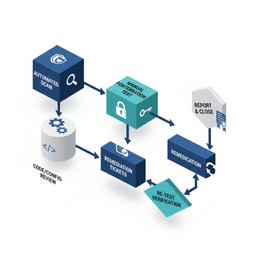
A real audit is planned. It has scope. It has rules of engagement. It results in a report you can act on, plus a re-test to confirm fixes.
Automated scans: good for fast wins
Automated scans help you find the easy problems quickly. They are great for ongoing hygiene.
They often catch:
- Outdated software like old WordPress core, plugins, themes, or dependencies
- Common misconfigurations like risky headers, exposed files, or weak permissions
- Known vulnerabilities with public exploit patterns
Think of this like checking doors and windows each night. It’s basic, but it matters.
Manual penetration testing: what scanners miss
Pen tests add the human element. A tester tries to break workflows, not just endpoints. They look for ways to chain smaller issues into a real breach.
This is where “business logic” problems show up. For example:
- Changing a price field in a checkout request
- Accessing other users’ records by guessing IDs
- Finding admin functions exposed in a front-end flow
If you want a broader view of how audits are run on networks, not just websites, this guide on conducting thorough network security audits is a helpful reference.
A pen test answers one question: “If someone tries hard to break in, can they?”
API risk matters here too. Many products now depend on APIs for logins, payments, content, and AI features. The 2025 State of API Security Report notes that only 21% of organizations can highly detect API attacks, and only 13% prevent over half of them. Top threats include DDoS at 37% and fraud at 31%.
Code and configuration reviews: fix problems at the source
These reviews go deeper than pen testing because they check how the system was built and set up.
- Code review: Someone reads your source code to find unsafe patterns, bad auth checks, and risky data handling.
- Configuration review: Someone checks hosting and cloud settings, secret storage, database access, and server hardening.
If your company does not have a senior technical owner, this is where things often slip. Many founders bring in outside leadership for this stage. Refact’s Fractional CTO Services page shows what that kind of support can look like when you need a plan and accountability, not just advice.
Your actionable website security audit checklist
You do not need to be a security engineer to prepare well. You just need a short list of smart checks, plus the right questions for your team or vendor.
The founder’s pre-audit checklist
Do these before you pay for a test. You will reduce risk right away, and you will get better results from the audit.
-
Review user permissions. Count how many people have admin access. Remove old accounts. Downgrade roles that do not need full control.
-
Update everything. WordPress core, plugins, themes, Shopify apps, dependencies. Many real-world attacks target old versions with known bugs.
-
Audit third-party access. Remove tools you no longer use. Old trials, old analytics, old automation. Every integration is another access path.
If you are about to relaunch, add a launch-focused QA pass too. This article, 5 things to check before launching, is built for that moment.
Commissioning a professional audit
A good audit is not just a report. It’s a plan you can execute.
The goal is not a grade. The goal is to understand risk, fix the right things first, and prove they are fixed.
Here’s what to ask for:
-
Clear scope. What is included? Public site, admin panel, APIs, mobile app, infrastructure, third-party services?
-
Testing method. Is it automated only, or does it include manual work? If you handle logins, payments, or private data, manual testing should be on the table.
-
Deliverables you can use. A good report explains impact in plain language, ranks findings by risk, and includes fix steps.
Some founders also need to prepare for security reviews from customers or partners. If that is you, it helps to see how structured frameworks think. This SOC 2 audit checklist is a useful reference for what “good controls” often look like.
Decoding costs and timelines
Security auditing can be cheap or expensive. The difference is scope and depth.
An automated scan is quick and low-cost. A full manual test on a complex app takes time, and time is what you pay for.
What drives the cost?
- Size and complexity: A five-page marketing site is not a multi-tenant SaaS with roles, billing, and APIs.
- Depth of testing: Automated scans can be a few hundred dollars. Manual penetration tests for complex apps can be $5,000 to $30,000+.
- Your stack: Standard WordPress is different from a custom React app with microservices and custom auth.
It also helps to keep the downside in mind. Cybersecurity Ventures forecasts global cybercrime costs could reach $10.5 trillion in 2025. If you want more context, this roundup of cybersecurity statistics for 2025 pulls together recent numbers on breaches and costs.
How long does an audit take?
Rushing security testing is how issues get missed. Build time for the test, the report, the fixes, and the re-test.
| Audit type | Typical duration (testing only) |
|---|---|
| Automated vulnerability scan | A few hours to 1 day |
| Basic manual pen test (small site) | 3 to 5 business days |
| Manual pen test (SaaS or e-commerce) | 1 to 3 weeks |
| Full scope (code, pen test, config) | 2 to 4+ weeks |
After the testing phase, you still need time to fix issues. This is where ongoing support can matter more than the audit itself. If your goal is to keep improving, not just “pass once,” teams that offer Website Optimization Services can help you keep patching, monitoring, and tightening over time.
Turning an audit report into an action plan
You get the report. It’s long. It’s technical. It’s full of “Critical,” “High,” and “Medium.”
Now comes the part that protects your business. You turn findings into a fix plan, then verify the fixes.
How to prioritize fixes without panicking
Not every “Critical” item has the same real-world risk. A good plan considers severity and likelihood, plus what the issue touches in your product.
For each finding, ask:
- What’s the impact? Data theft, account takeover, downtime, fraud, defacement?
- How easy is it? Can a script exploit it quickly, or does it take rare skills and access?
- Is it on a money path? Checkout, login, admin tools, pricing, and customer data should be top priority.
When you do this, you usually end up with three buckets:
- Fix now (today or this week)
- Fix next sprint (planned engineering work)
- Fix this quarter (lower risk, but still worth doing)
How to work with your dev team
Forwarding a PDF is not a project plan. Convert each finding into a ticket your team can build and test.
Each ticket should include:
- Clear title (example: “Fix XSS on user profile page”)
- Reference to the exact report section
- Steps to reproduce so the team can confirm the bug
- Definition of done so everyone agrees what “fixed” means
After the fixes ship, re-test the exact items that were reported. This is non-negotiable. It confirms the issue is closed and that you did not create a new one by accident.
Security threats also change. New risks show up as products add AI assistants, more APIs, and more integrations. Keeping up is less about one big event and more about steady habits.
Real-world questions founders ask
When is the right time for my first audit?
Do your first formal security audit right before launch, or before a major feature release. If you’re taking payments or storing personal data, do not wait until “after traction.”
After launch, a good baseline is yearly. Also do it after big changes like a new payment processor, a hosting move, or major authentication updates.
Can I rely on automated scanners only?
Use scanners, yes. They are great for catching easy issues. They should be part of routine maintenance.
But scanners cannot understand how your product works. They miss logic flaws, chained attacks, and “weird” edge cases. If you have logins, payments, private data, or admin tools, manual testing is often worth it.
Automated scans check for unlocked doors. Pen tests check whether the locks can be picked.
What should I look for in a security partner?
Look for someone who asks about your business, not just your URL. They should want to understand your users, your data, and your revenue paths.
Ask for a sample report. If it’s unreadable, it won’t help you fix anything.
Also ask, “Can you help us remediate?” A report without follow-through often ends up ignored, especially for small teams.
Conclusion: close the back door before launch
A security audit is not about fear. It’s about protecting the thing you are building and the trust you are trying to earn.
If you want a simple checklist-style resource to tighten your technical foundation, the Website Mastery for Publishers guide is a good place to start.
Want help scoping an audit, fixing what’s found, and building safer going forward? Refact partners with founders across strategy, design, and engineering. Talk to us through the Refact contact form, and we’ll map out a practical security plan for your product.


