


Your platform got you to revenue. Now it might be the thing slowing you down.
Most founders feel it before they can prove it. Pages get slower. Support tickets rise. “Small” feature requests take weeks. Then one big traffic spike hits and everything starts to wobble.
If you’re asking whether it’s time for a platform migration, you’re not alone. This guide breaks down the warning signs, what a migration really is, the risks to plan for, and a practical way to move without breaking your business.
Is Your Platform Quietly Blocking Growth?
It’s easy to tell yourself slow load times and random bugs are normal. But when those issues become frequent, they stop being “annoying” and start becoming a growth limit.
Your platform is not just a tool. It’s the base your business sits on. When the base is shaky, everything on top gets harder.
Warning signs founders should not ignore
Ask yourself if you’ve said any of these lately:
- “We can’t ship that feature because the system can’t handle it.”
- “We’ll fix the site speed later, it’s not urgent.”
- “Only one developer understands this part of the code.”
- “Every change breaks something else.”
These are the signals that your current setup was built for an earlier stage of the company.
If you want a fast sanity check, start with three questions before a new CMS. The same thinking applies even if you’re not switching CMS.
The real problem is simple: your platform was built for where you were, not where you’re going. When your business changes and your tech does not, you pay in revenue and trust.
The cost of doing nothing
Founders often delay a migration because it feels risky. That makes sense. But staying put has a cost too.
Slow checkouts reduce sales. Crashes during spikes waste marketing spend. Long dev cycles block new revenue. Over time, the “safe” choice becomes the expensive choice.
At some point, you stop asking “Can we migrate?” and start asking “Can we afford not to?”
What Platform Migration Actually Means
Platform migration sounds scary because it usually is a big change. The idea is still simple.
It’s moving your core digital operation, content, customer data, and business logic, from one foundation to another. It can be a full rebuild, a replatform, or a structured move to a new architecture.
It is more than a tech swap
Think of your business like a library. Your “books” are content and customer data. Your “checkout desk” is payments or signups. Your “floor plan” is the user experience.
If the building is too small, the shelves are a mess, and checkout takes forever, a new coat of paint will not fix it. You need a better building.
A platform migration is that move. Done right, you keep what matters and change what is holding you back.
Common types of migrations
Most moves fall into a few buckets:
- Monolith to modern architecture: Often a move from a heavy all-in-one setup to a headless CMS or better API-driven structure.
- Legacy rebuild: A SaaS rebuild when the old codebase is too slow, fragile, or hard to ship from.
- Outgrowing a hosted platform: A brand that needs more control than a template-based system can offer.
The pattern is the same each time. The old platform becomes a barrier, and the goal is to remove that barrier without losing what you’ve built.
Why Founders Decide to Migrate
Nobody chooses a platform migration for fun. The decision usually starts with pain you can measure.
For publishers, it’s traffic spikes that make pages fail. For e-commerce, it’s checkout speed and drop-off. For SaaS, it’s feature delivery that keeps slipping because the code is tangled.
From pain to outcome
Good migrations tie a real business problem to a clear outcome. Examples:
- “Pages load too slowly” becomes “improve speed so conversions and SEO recover.”
- “We can’t ship features” becomes “reduce build time so we can compete.”
- “Downtime and bugs are constant” becomes “stability so the team can focus.”
Common triggers and what they change
This table shows what founders usually feel first, what’s happening under the hood, and what a successful migration aims to solve.
| Business problem | Why it happens | Goal after migrating |
|---|---|---|
| Slow performance, high bounce | Bloated code, poor caching, weak hosting, too many plugins, platform limits | Faster UX that keeps users and improves sales and search |
| Features take forever | Messy architecture, hidden dependencies, no clean testing or release process | Faster shipping with clearer systems and predictable releases |
| High maintenance and downtime | Aging infra, security risks, too much custom patching, manual processes | More stability and lower ongoing cost to run the platform |
The danger of waiting too long
The most common mistake is waiting until the platform is failing weekly.
Technical debt works like interest. The longer you delay, the more every change costs. When the bill comes due, it often comes with lost trust, not just a bigger dev invoice.
If you want an example of what a complex modernization can look like, see the Teton Gravity Research case study. It’s a good reminder that “platform” is usually many systems working together.
How to Plan a Migration Without the Headaches
A calm migration starts with a clear plan. Treat it like a construction project with phases, not a late-night emergency.
Here’s a simple roadmap that works for most founders.
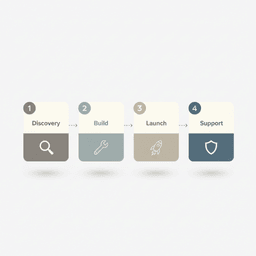
Phase 1: Discovery and strategy
This is where most migrations are won or lost. Before you move anything, you need a full picture of what exists today and what “success” looks like.
Key items to map:
- Data: where it lives, how clean it is, what fields matter, and what can be retired.
- SEO: top pages, link equity, index coverage, and a redirect plan that covers every important URL.
- Integrations: email, payments, analytics, ads, CRM, membership tools, and internal workflows.
- Business rules: the “small” logic in code that runs billing, permissions, and user states.
If your migration includes a CMS or a large content library, read prepare content for a CMS migration. Content inventory and field mapping saves weeks later.
Phase 2: Build the new system
Once the plan is approved, you build the new platform in parallel. Your current platform keeps running while the new one gets created and tested.
This is also where the right partner matters. Building is not just coding. It is product decisions, UX choices, and tradeoffs that affect growth.
If you want a sense of what we mean by “build,” our website development services page outlines the common workstreams, including migrations and integrations.
Phase 3: Launch and cutover
Launch day should be boring. That is the goal.
Plan for near-zero downtime by rehearsing the steps. Validate data imports, test integrations, and run real QA in a staging environment that matches production.
A helpful reference is our pre-migration checklist. It focuses on what to capture before you switch so you can compare performance after.
Phase 4: Post-launch support
Going live is not the end. It’s the start of a new baseline.
Expect small fixes, tracking updates, and workflow tuning in the first few weeks. This is normal. What matters is having a plan for monitoring and quick response.
The Hidden Costs and Risks to Plan For
Platform migration is a big investment. The risks are real, but most of them are predictable.
When teams get surprised, it is usually because they skipped discovery, rushed QA, or did not plan for people and process.
Data loss and dirty data
Data moves are rarely clean. Old systems collect “junk” over time. Field formats change. Teams invent workarounds. That mess shows up during migration.
Plan time for cleaning and validating data, not just moving it.
SEO drops from poor mapping
SEO losses are not “just part of migrating.” They usually happen for specific reasons: missing redirects, changed URL structures, thin pages that lost internal links, or blocked crawling.
A solid redirect map and content plan keeps traffic stable. It also helps you improve performance and site structure after the move.
If you want a fuller breakdown of risk controls, the low-risk website migration guide lays out what to protect and when.
The people problem
Your team’s habits are tied to the current platform.
If the new system changes how editors publish, how support handles users, or how sales pulls reports, you need training and buy-in. Otherwise, adoption slows down and the migration feels like a “failure” even if the tech works.
A platform migration is a people project and a process project, not only a tech project. Ignoring that is one of the fastest ways to create chaos.
What to Do Next
If you’re considering a platform migration, don’t start by debating frameworks. Start by getting clear.
Write down the friction points you can measure. Then tie each one to a business goal.
Start with business goals
Be specific. “It’s slow” is not useful. “Checkout takes eight seconds and drop-off rises at that step” is useful.
Then ask: where do we want to be in two years? More revenue, more users, more channels, fewer manual processes, faster feature delivery. Your plan should support that future state.
Your simple next step
- List your top three platform problems with numbers when possible.
- Define your two-year goal in one sentence.
- Talk to a partner who starts with goals and constraints, not tools.
If you want to talk through your situation, schedule a call. We’ll start with what the business needs next, then work backward into the right plan.
Platform Migration FAQs
How long does a platform migration take?
It depends on complexity and how much needs to change.
A simple content site might take 8 to 12 weeks. A complex SaaS with lots of custom logic and large datasets can take 6 to 9 months or more.
Timeline is usually driven by:
- Data volume and data cleanliness
- Number of integrations
- How much custom functionality must be rebuilt
Will we lose SEO rankings?
A well-run migration should have minimal long-term SEO impact.
The key is planning. You need a full URL inventory, a redirect map, content parity checks, and post-launch monitoring. Speed and technical improvements can also help rankings over time.
If a migration has no SEO plan, it’s not a plan. It’s a bet with your most valuable traffic channel.
What is the biggest mistake founders make?
Waiting too long is the biggest one. It turns a planned project into an emergency.
The second is forgetting the internal team. If you do not involve the people who use the platform daily, adoption slows down and the benefits take longer to show up.


