


Your site finally gets attention, then everything slows down. Pages hang, logins fail, checkout breaks, and users leave. If you want a high traffic site, that moment is not a surprise. It is a test you should plan for from day one.
Traffic growth is good, but unplanned growth can wreck a business. The fix is not one magic tool. It is the right foundation, smart tech choices, and performance work that starts early.
From idea to launch: build a foundation that can take a hit
Founders often picture the upside of millions of visits. Fewer think about the first serious spike. That is when weak hosting, messy code, and slow databases show their teeth.
This guide is not about bragging rights. It is about building something stable that can keep earning money when it gets popular. If you want to see how real publisher stacks are put together, review these tech stack examples founders can compare.
What “high traffic” means in plain terms
High traffic is relative. For a new blog, 10,000 visits a month can feel huge. For a fast-growing publisher, 100,000 to 200,000 visits might be normal. For the biggest platforms on the web, the numbers are hard to picture.
So instead of chasing a number, define your reality. What matters is how many users you must serve at once, what they do on the site, and how painful it is when something breaks.
The goal is not just to launch. The goal is to keep the site stable when success shows up all at once.
The trade-offs you cannot avoid
Every scaling plan is a set of choices. These are not just engineering choices. They are product choices, budget choices, and timing choices.
- Speed vs. features: Do you ship one more heavy feature, or keep the first version fast and simple?
- Cost vs. headroom: Do you start cheap and risk downtime, or pay more to handle spikes?
- Flexibility vs. ease: Do you need a simple CMS, or a setup that can power web, mobile, and more?
Make these calls early, then document them. It will save you from rewrites later.
Choosing a tech stack that will not trap you later
Founders get bombarded with opinions. One team says, “Use WordPress.” Another says, “Go headless.” Another says, “Build everything custom.”
The best stack is the one that fits your product, your team, and your timeline. It should also match how you plan to publish content and ship features for the next two years.
Monolithic vs. headless: what you are really choosing
A monolithic CMS is an all-in-one setup. The admin, templates, and site live in one place. It can be quick to ship and easy to manage for small teams.
A headless setup splits the CMS from the front end. The CMS stores content. The front end pulls that content through an API. This can be great for performance and multi-channel publishing, but it adds moving parts.
If you want a clearer explanation with pros and cons, read what headless WordPress means.
There is no universal “best.” There is only what fits your roadmap, budget, and team skills.
The WordPress question: can it handle big traffic?
Yes, WordPress can run a high traffic site. The common failure is not WordPress itself. The failure is poor hosting, too many plugins, and no caching plan.
When WordPress is built well, it can serve millions of pageviews a month. The basics that matter:
- Real hosting: avoid shared hosting for anything that needs to scale.
- Layered caching: page caching, object caching, and CDN caching each play a role.
- Lean build: a simple theme and vetted plugins beat a bloated “do everything” stack.
One common win is switching from a closed, slow CMS to a custom WordPress build. Editors publish faster, pages load faster, and the business can grow without weekly fires.
When a headless approach makes sense
Headless is not a status symbol. It is a tool. It tends to make sense when you need one content source feeding many outputs, or when your front end must be very fast and tailored.
- Multi-platform delivery: website, app, email templates, kiosks, or partner feeds.
- Fast front end needs: you want more control over how pages render and cache.
- Complex product logic: memberships, custom dashboards, and app-like flows.
If you are unsure which direction matches your build, Refact’s website development services focus on choosing architecture based on goals, not hype.
Performance is a growth feature, not a final polish
Speed is a product feature. If a page is slow, users bounce. If checkout lags, sales drop. If your site is flaky during spikes, you lose trust.
Performance work is easier and cheaper when you start early. Fixing speed later often means ripping out choices you already shipped.
The millisecond problem (and why it shows up in revenue)
Small delays add up. A site that feels slow makes people hesitate. That means fewer signups, fewer reads, fewer purchases, and fewer shares.
For one DTC brand, fixing image delivery and reducing extra backend calls cut seconds off the path to checkout. The result was a clear lift in conversion.
Three performance must-haves
Most speed issues trace back to a few root causes. If you get these right, you avoid many scaling problems later.
- Server response time (TTFB): If the first byte is slow, everything feels slow. Use clean backend code, sensible caching, and proper hosting. For a simple walkthrough, see how to test response time.
- Caching that matches your content: Cache static pages hard. Cache dynamic pages carefully. Know what must stay real-time, like pricing, inventory, or user dashboards.
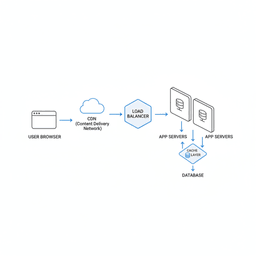
- CDN for global speed: A CDN serves assets closer to users, which cuts latency and reduces load on your origin server.
Caching can fix speed, but bad caching can also break trust. Treat it like product logic, not a checkbox.
The database is often the bottleneck
When traffic climbs, the database gets hit from every angle. Reads spike as content gets shared. Writes spike as users sign up, comment, or buy.
The most important thing is not the database brand name. It is how you design tables, indexes, and queries. One bad query can block others and slow the whole site.
If you are already seeing slow pages, this is also where ongoing website optimization help can pay off fast.
Scaling without breaking your platform
You launch, then traction comes. The numbers move from 1,000 to 10,000. Then a mention in a big newsletter hits, and you jump again.
Your job is to make sure growth feels like a win, not an emergency. That means having a scaling plan before you need it.
Vertical vs. horizontal scaling
Vertical scaling means upgrading one server. More CPU, more RAM, faster disks. It is simple and can work for a while.
Horizontal scaling means adding more servers and splitting traffic across them. This is how most high-traffic platforms stay stable. If one server fails, others can still serve users.
Plan for horizontal scaling early, even if you start on one server. Early choices can keep that door open.
Scaling tactics that hold up in the real world
Once traffic is real, you need systems that reduce single points of failure and spread load.
- Load balancing: Distribute requests so no single server gets crushed.
- Database replication: Send read traffic to replicas, so the primary database can focus on writes.
- Serverless for bursty tasks: Great for jobs like image processing, email events, and background tasks.
As you scale, keep security in the plan. Traffic spikes often attract bots, fraud, and abuse, especially around signup and checkout flows.
Your path from founder to publisher
This topic can feel technical fast. The trick is to start with clear goals and a realistic plan, then let those guide the build.
If you run a content business, it helps to have a simple checklist of common improvements. This publisher website checklist is a good place to start when you want quick wins without breaking your stack.
Turn a big idea into a plan you can execute
A plan is not a generic template. It should match your product, your audience, and your business model.
Define success in 24 months. Is it monthly readers, paid members, leads, or revenue? Once that is clear, the stack and scaling choices get simpler.
The most important early decision is your business goal. The tech should follow that, not the other way around.
A simple way to think about growth stages
Most sites follow a similar path:
- Start with one stable app and strong caching.
- Add load balancing and replicas as traffic becomes steady.
- Move bursty jobs into background systems and serverless tools.
You do not need to buy everything on day one. You do need a stack that can grow without a full rebuild.
Next steps you can take this week
- Write your 24-month goal: pick one metric that defines success.
- List your top three risks: speed, cost, security, hiring, or platform limits.
- Get an outside review: a short technical audit often finds the fastest fixes.
Frequently asked questions
How much does it cost to build a high-traffic site?
Cost depends more on complexity than raw traffic. A content-focused site can be affordable if it is built clean and cached well. A SaaS product with accounts, payments, and heavy logic costs more because there is more to build and maintain.
The biggest cost drivers tend to be custom features, integrations, and how much uptime you need during spikes.
When should I worry about scaling?
Think about scaling from day one, but do not build a spaceship for your first 100 users. Make early choices that avoid dead ends later.
A good rule is to build for your next order of magnitude. If you have 100 users, build for 1,000. If you have 10,000 visits, build for 100,000.
Can WordPress really handle a high-traffic site?
Yes, if it is built correctly. WordPress fails under load when it is placed on weak hosting, stuffed with heavy plugins, and shipped without a caching plan.
When the architecture is clean, WordPress can support large publishers and major ecommerce catalogs without falling apart.
Do I need a technical co-founder to build this?
No. You need clear product direction and a team that can execute and support the platform as it grows. Many founders work with a product and engineering partner instead of hiring a full-time technical co-founder right away.
Ready to build without guessing? If you want a plan for a high traffic site that matches your goals, talk with Refact. Book a strategy call and we’ll map the build, performance, and scaling steps.


