


You have the traffic. You have products people want. But sales still feel stuck. In many stores, the issue is not the offer, it is the experience. A confusing product page, a slow mobile load, or one checkout field that feels “off” can push shoppers to pause. Most never come back.
I have had this exact talk with founders again and again. They know something is leaking, but they cannot see where. One client had a 40% cart abandonment rate. We tracked it to one unclear form field in checkout. After a small change, they recovered thousands in monthly revenue.
The good news is that UX is not guesswork. It is a set of repeatable steps you can test. If you want a fast starting point, begin with a website audit so you know which pages and steps are losing buyers.
This 2026 guide is a practical checklist of ecommerce ux best practices that reduce friction, build trust, and help more shoppers finish the purchase. Use it to pick one problem, fix it, measure results, then move to the next.
1. Checkout That Feels Easy
Checkout is where many stores lose the sale. Shoppers already said “yes” by adding to cart. Then they hit long forms, forced accounts, or surprise costs. That pause creates doubt.
Baymard Institute research often cites long or complicated checkout as a major driver of abandonment. The goal is simple: make paying feel clear and quick. Small fixes here can show results fast. If you need a deeper playbook, see our guide on how to improve ecommerce conversion rate.
Key Implementation Steps
- Make guest checkout the default: Let people buy without creating an account. Offer account creation after purchase.
- Add address autocomplete: Tools like Google Places can reduce typing and errors.
- Show clear steps: A progress bar like “Shipping > Payment > Review” reduces anxiety.
- Validate fields as they type: Flag issues right away, not after they hit submit. If you run Shopify, a one-page approach can also help. This guide on one page checkout on Shopify gives examples.
Founder Insight: Remove fields one at a time. Ask, “Do we need this to ship the order?” Fewer fields usually means more completed checkouts.
2. Product Photos That Answer Questions
Online, your photos do the work of touch and feel. If images are dark, inconsistent, or low detail, shoppers assume the product is the same. Strong photos make quality feel real.
Good visuals lower uncertainty. They also reduce returns because buyers know what to expect. Brands like Nike and Allbirds show multiple angles and detail shots so the product feels “inspectable.”
Key Implementation Steps
- Show context and scale: Include lifestyle shots, not only white backgrounds. For apparel, show it on different body types.
- Keep photography consistent: Same lighting, framing, and background style across the catalog. For a helpful how-to, see this guide on how to take good product pictures.
- Include high-res zoom: Let shoppers check stitching, texture, and materials, especially on mobile.
- Keep pages fast: Use WebP, compression, and lazy loading so quality does not mean slow.
Founder Insight: Add a short product video. For one home goods brand, a simple 15-second demo lifted add-to-cart clicks by 18% on that page.
3. Product Pages That Are Easy to Scan
Your product page is your salesperson. If key details are buried, shoppers hesitate. If information is messy, they leave to “research later.”
Strong pages answer common questions fast. They also guide the shopper from interest to decision without forcing a long read.
Key Implementation Steps
- Use progressive disclosure: Put the basics first, then details below or inside expandable sections.
- Use spec tables when needed: Tables are easier to scan than paragraphs for technical items.
- Say who it is for: Help shoppers self-qualify quickly with clear use cases.
- Standardize your layout: Keep shipping, returns, sizing, and FAQs in the same spot across products.
Founder Insight: List the top five questions customers ask. Can a shopper find answers in five seconds without scrolling? If not, your page order needs work. A simple study using web usability testing can confirm what to move.
4. Trust Signals That Reduce Purchase Anxiety
New visitors arrive unsure. They wonder if the site is real, if checkout is safe, and what happens if the product is not right. Your job is to answer those fears before they form.
Trust signals are not decoration. They are conversion tools. Reviews, guarantees, and secure payment cues can make the difference between “buy now” and “maybe later.”
Key Implementation Steps
- Show reviews with counts: A strong average plus many reviews feels believable.
- Place payment and security cues near checkout: Use recognizable payment logos and security messaging where it matters.
- Feature real customer photos: UGC often feels more honest than studio shots.
- Make returns and guarantees easy to find: Put them on product pages, cart, and checkout.
Founder Insight: Ask reviewers specific questions. You get better copy for product pages and ads when reviews include details, not just stars.
5. Mobile-First Layouts That Sell
Most shoppers browse on a phone. If your mobile experience feels cramped or slow, they bounce. Mobile is not a “smaller desktop.” It is its own use case.
Mobile-first design means you start with the smallest screen. Then you expand the layout for desktop. This also supports Google’s mobile-first indexing.
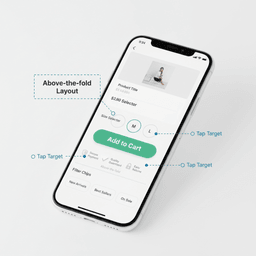
Key Implementation Steps
- Make key info visible right away: Image, price, variant selectors, and add-to-cart should show without hunting.
- Design for thumbs: Use large tap targets, at least 44×44 pixels.
- Serve the right image sizes: Use
srcset, WebP, and lazy loading to keep pages light. - Test on real devices: Try iPhone and Android on slower networks to catch issues early.
Founder Insight: Buy from your own store with one hand while walking. If you cannot do it easily, your customers cannot either.
6. Search and Filters That Help People Find Products
Search users often have high intent. They want something specific. If your search is strict or fragile, they leave and buy elsewhere.
Good search is not only for big catalogs. Even small stores benefit when shoppers look for size, color, or a specific product name.
Key Implementation Steps
- Use faceted filters: Allow multiple filters at once with instant updates.
- Support typos and synonyms: “Womans shrt” should still find “women’s shirt.”
- Add autocomplete: Show suggestions, categories, and products as they type.
- Show counts per filter: Prevent “dead end” clicks with zero results.
Founder Insight: Track “zero result” searches. That list tells you what people want but cannot find. It can reveal missing products or bad tagging.
7. Pricing Clarity That Prevents Last-Second Drop-Off
Surprise costs kill trust. Shipping fees, taxes, or handling charges that appear at the end feel like a trick, even if they are normal. Many shoppers leave right there.
Baymard often reports unexpected extra costs as a top reason for abandonment. Your job is to make totals predictable before checkout is almost done.
Key Implementation Steps
- Show shipping estimates early: Add a calculator on the cart or product page.
- Promote free shipping thresholds: Use cart messaging like “$15 away from free shipping.”
- Itemize the order summary: Subtotal, shipping, tax, discounts, and final total should be clear.
- Set expectations about tax: Estimate tax in cart when possible, not at the last step.
Founder Insight: Shipping and returns can be part of your brand promise. If you cannot make them free, make them clear and easy to understand.
8. Persistent Cart and Saved Items
Shoppers get interrupted. A saved cart respects their time. Without it, they may not bother rebuilding the list.
Saved items also create a low-pressure path back to purchase. Many customers use wishlists as “thinking space,” especially for higher-priced items.
Key Implementation Steps
- Make “save for later” obvious: Place it near the add-to-cart button.
- Support guests: Save carts with cookies and offer account creation later for cross-device sync.
- Send cart reminder emails: Include item photos and send at 6 to 12 hours, then 24 to 48 hours.
- Notify on changes: Send alerts for price drops or low stock on saved items.
Founder Insight: Saved-item data shows desire. If people save but do not buy, test price, messaging, and shipping incentives.
9. Site Speed That Protects Revenue
Speed is not a “nice to have.” Slow pages feel risky, especially on mobile. If the page stalls, shoppers assume checkout will stall too.
Google has shared that even small delays can hurt mobile conversion rates. Speed also supports SEO through Core Web Vitals.
Key Implementation Steps
- Measure first: Use PageSpeed Insights and WebPageTest. Track Core Web Vitals over time.
- Fix images: Compress, use WebP, and lazy load below-the-fold images.
- Use a CDN: Serve content from locations close to each shopper.
- Delay non-essential scripts: Heatmaps, chat widgets, and extra tags can slow first load. For a step-by-step approach, see how to test response time like a founder.
Founder Insight: Set a performance budget. If a new app or script breaks it, it does not ship until it is fixed.
10. Recommendations That Feel Helpful
Recommendations can raise average order value when they match the shopper’s intent. The goal is not to push random best-sellers. It is to suggest what makes sense with the item they already want.
Think “complete the set,” not “buy more stuff.” When recommendations are relevant, shoppers feel guided, not sold to.
Key Implementation Steps
- Start simple: Curate related products by use case or collection before adding complex systems.
- Place them where they work: Product page, cart, and post-purchase emails are common wins.
- Add context in the header: Use labels like “Goes well with” or “Complete your order.”
- Personalize later: After you have data, tailor suggestions based on browsing and past purchases.
Founder Insight: Use your own order history. The best “bought together” pairs come from real carts, not guesses.
10-Point Ecommerce UX Best Practices Comparison
| Feature | Implementation Complexity | Resource Requirements | Expected Outcomes | Ideal Use Cases | Key Advantages |
|---|---|---|---|---|---|
| Checkout flow fixes | Medium | Front-end/back-end work, payments, testing | Lower abandonment, more completed orders | High-traffic stores, mobile-heavy traffic | Faster buying, fewer errors |
| Product imagery and zoom | High | Photography, editing, performance work | Higher confidence, fewer returns | Apparel, DTC, furniture | Trust, clarity, higher engagement |
| Product page structure | Medium | Content, templates, CMS setup | More add-to-cart, fewer support questions | Complex or spec-heavy items | Easy scanning, easier comparison |
| Trust signals and reviews | Medium | Review tool, moderation, UGC process | Higher conversion, lower anxiety | New brands, higher-priced items | Credibility, faster decisions |
| Mobile-first design | High | Front-end work, QA on devices | More mobile sales, better SEO | Mobile-majority stores | Better usability, fewer bounces |
| Search and filters | High | Search vendor, metadata, tuning | Faster product discovery, higher conversion | Large catalogs, many variants | Findability, fewer zero-result exits |
| Pricing transparency | Medium | Shipping/tax logic, UX copy | Lower abandonment, higher trust | International sales, price-sensitive buyers | Fewer surprises, fewer refunds |
| Persistent cart and saved items | Medium | Cookies/accounts, email flows | More recovered carts, more repeat visits | Long decision cycles, gift buying | Convenience, retention |
| Performance and speed | High | Engineering time, CDN, monitoring | Higher conversion, better SEO | All ecommerce sites | Faster pages, better perception |
| Recommendations and cross-sells | Medium to High | Merch rules or tools, UX space | Higher AOV, better discovery | Complementary catalogs | Higher basket size, better browsing |
Your Next Steps: Make One Fix This Week
Ten ideas can feel like too much. Do not try to change everything at once. Pick one spot that is clearly losing buyers, fix that, then measure the result.
Your Immediate Action Plan
- Find the biggest leak: Check where people drop off. High cart abandonment points to checkout or pricing. High mobile bounce points to mobile issues. If you want help prioritizing, our website optimization services are built for small, measurable improvements.
- Run one small test: Remove two checkout fields, add shipping estimates earlier, or place trust messaging closer to the buy button. Keep the change focused so results are easy to read.
- Track the outcome: Give it one to two weeks. Watch conversion rate, bounce rate, and checkout completion. Small lifts add up fast.
If you find that your platform or build is holding you back, there are two common paths. If you are planning bigger changes, our website development services can help with search, cart persistence, and performance work. If Shopify or your current stack no longer fits, start with ecommerce development services, or consider ecommerce migration services when platform limits are costing sales.
If you are looking at analytics and still unsure what to fix first, we can help. Refact turns these UX fixes into a clear plan with priorities, timelines, and measurable goals. Start the conversation here: talk to Refact.


