


You have a great product and a clear brand idea. But building an online store that actually sells is a different job. That is where ecommerce development services come in. You are not just hiring someone to “build a site.” You are hiring a partner to build the systems that take payments, manage orders, and support growth.
This article will help you decide if Shopify fits your idea, what other options look like, what the build process should include, and how to pick the right team.
So, you need to build an online store. What now?
Let’s be honest. You are the expert in your product, your customers, and your marketing. You probably are not an expert in payment gateways, APIs, databases, or security updates. That is normal.
Your time is best spent sourcing, selling, and serving customers. It is not best spent fixing a plugin conflict that broke checkout. If you want a store that looks professional and works every day, you need a real build plan and the right help.
If you already know you want help building and connecting tools, start with our website development services to see what that support can include.
It’s more than a pretty website
A working ecommerce store has a lot going on behind the scenes. It tracks inventory, processes payments, calculates shipping, and sends order data to the right tools. It also needs to handle real traffic without slowing down.
If one piece fails, you can lose sales fast. Worse, you can lose trust. That is why good development matters.
A good ecommerce partner does not just build pages. They build the core systems that support buying, fulfillment, and repeat sales.
Why getting it right from the start matters
Moving fast is tempting. But shortcuts often show up later as slow pages, bugs, and security risks. Those problems are expensive to fix after you already have customers.
The global ecommerce platform market is projected to grow from USD 11.55 billion in 2025 to USD 61.83 billion by 2034. That means more competition. A store that loads slowly or breaks at checkout is not just a tech issue. It is a revenue issue.
Before you spend on a build, make sure your platform choice and feature list match your business goals. If you are switching platforms, the Shopify migration playbook is a good next read.
Choosing your foundation: the flavors of ecommerce platforms
Think of a store platform like choosing a building to run your business. You can rent a space that is ready today. You can buy a place you can remodel. Or you can build from scratch.
Each choice can work. The right one depends on your budget, timeline, and how unique your business model is.
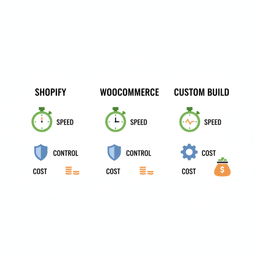
Comparing your ecommerce platform options
| Platform | Best For | Typical Initial Cost | Pros | Cons |
|---|---|---|---|---|
| Shopify | DTC brands, physical products, and founders who want to launch fast. | $1,000 – $10,000 for a professional theme and setup. | Fast launch, stable hosting, managed security, strong app ecosystem. | Limits on deep changes, added costs for apps, you do not own the platform code. |
| WooCommerce | Content-heavy sites, unusual product logic, and teams that want more control. | $5,000 – $25,000+ based on features and integrations. | Very flexible, open-source, strong WordPress ecosystem, full ownership. | You manage hosting, updates, and security. Performance depends on setup. |
| Custom build | Unique models like marketplaces, advanced subscriptions, or complex B2B flows. | $50,000 – $100,000+ to start. | Full control, built around your workflow, can scale for special needs. | High cost, longer timeline, ongoing technical maintenance required. |
Shopify: the all-in-one powerhouse
Shopify is a hosted platform. It handles hosting, security, and many payment basics for you. That is why so many product brands start there.
You pay a monthly fee. You pick a theme. You add apps for extra features. For many stores, that is enough to build a strong business.
The tradeoff is control. Some changes are hard to do, and some are not possible without workarounds. Your costs can also rise as you add apps.
Shopify is a strong starting point for most new product brands because it reduces tech work and speeds up launch.
If you want to build, improve, or expand on Shopify, our guide on Shopify development for founders covers setup, scaling, and common build choices.
WooCommerce: flexibility on WordPress
WooCommerce turns WordPress into an online store. You host it yourself, so you own the code and data. That gives you more control.
WooCommerce is a good fit when content is a big part of the business, like SEO-driven blogs, guides, and landing pages. It can also work well when you need special product logic.
The tradeoff is management. Updates, hosting, security, and speed are on you, or on your partner.
Custom builds: the flagship store
A custom build is for cases where no platform fits. That can include a two-sided marketplace, complex subscription rules, or deep integrations with internal systems.
It gives you full control. It also requires more budget, more time, and ongoing engineering support. For most new brands, it is not the best first move.
In many cases, a platform plus smart integrations can get you where you need to go. If your current site is holding you back, website redesign services can help you decide what to fix first and what to rebuild.
Our blueprint for building your ecommerce store
Building a store should not feel like sending requirements into a black hole. You should know what happens next, what decisions you need to make, and what “done” looks like.
Here is a clear process that keeps the project simple and trackable.
Step 1: strategy and discovery
This is where you get clear on goals, customers, and scope. You decide what must be in the first version and what can wait. You also define how the store will connect to shipping, email, and accounting tools.
This step protects you from building the wrong thing. It also protects your budget.
Step 2: UI and UX design
Design is not only about style. It is also about how a customer moves from product page to checkout.
- UX design: page layout plans and flows that reduce confusion.
- UI design: colors, type, and visuals that match your brand and build trust.
A good design focuses on clear product info, clean navigation, and a checkout that feels safe and easy.
Step 3: engineering and QA
Development should happen in short cycles so you can review progress often. That keeps small mistakes from turning into big problems.
QA matters just as much as coding. Testing should cover mobile, desktop, browsers, payment flows, emails, taxes, and edge cases like out-of-stock items.
Step 4: launch and ongoing partnership
Launch is not the end. After launch, you will learn what customers do, where they drop off, and what questions they ask.
This is where ongoing support helps. That can include bug fixes, new features, performance work, and conversion improvements.
Your store is a living part of the business. It should change as your products, marketing, and customers change.
For ongoing speed, SEO, and conversion work, our website optimization services cover the kind of improvements that can raise sales without a full rebuild.
Essential services beyond the shopping cart
A store is more than product pages. The real work happens when the store connects to the tools that run your business.
Think of this as the support system that keeps orders moving and customers informed.
Connecting your store to the tools you use
Most stores need third-party integrations. These connections move data between your store and other systems.
- Shipping and fulfillment: send orders to ShipStation or a 3PL so shipping is not manual.
- Email marketing: sync customer and order data to tools like Klaviyo or Mailchimp for automated emails.
- Accounting: connect to QuickBooks or Xero to reduce manual bookkeeping.
The goal is simple, fewer manual steps and fewer mistakes.
Ensuring a smooth and secure checkout
Checkout is where stores win or lose. Payment setups with Stripe, PayPal, Apple Pay, and buy-now-pay-later options need to be tested end to end.
Security also matters. You want fraud tools, good error handling, and clean confirmation emails. Customers should never feel unsure about the purchase.
Speed, stability, and planning for the next phase
As your traffic grows, speed and uptime matter more. Even small delays can reduce sales. A common stat says a one-second delay can lead to a 7% drop in conversions, which is why performance work should be part of the plan.
Sometimes the next phase is a platform change. If you outgrow your platform, a migration needs a plan for products, customers, orders, redirects, and SEO.
If you think you might need to switch soon, read the ecommerce migration guide. If you are ready to move now, our ecommerce migration services focus on protecting sales and search traffic during the change.
Your online store is the hub for orders, customer data, and operations. If it is slow or disconnected, growth gets harder.
The ecommerce market is forecasted to grow from USD 33.8 trillion in 2025 to USD 243.4 trillion by 2034. With that scale, stores that run clean operations and avoid tech debt have an edge.
How to choose the right development partner
The team you pick has a direct impact on cost, speed, and results. A good partner helps you make better decisions, not just build what you ask for.
Here is what to look for.
Look for a real track record
Ask for work that matches your business model. A team that builds basic sites might not be ready for complex subscriptions or advanced integrations.
Case studies should show outcomes, not only screenshots. Look for numbers like higher conversion, more revenue, fewer support tickets, or faster load time.
Questions to ask before you sign
- “Have you built a store like mine?” Similar products and workflows matter.
- “How do you handle scope changes?” You will have new ideas, that is normal.
- “Can I talk to a past client?” This helps you understand how they communicate and deliver.
A good partner answers in plain language and ties everything back to business goals.
Red flags to watch for
- They push one tech for everything. Shopify, WooCommerce, and custom builds all have a place.
- They hide behind jargon. Confusing communication early is a bad sign.
- The quote is too low. It often leads to missed scope, weak QA, or surprise fees.
The right partner feels like part of the team. They ask hard questions, explain tradeoffs, and stay focused on outcomes.
Your ecommerce development questions answered
These are the questions founders ask most often when they start pricing and planning ecommerce development work.
How much does an ecommerce website cost?
Cost depends on platform choice and complexity. A Shopify theme setup with professional design can be in the low thousands. More custom work, more integrations, and more unique features increase cost fast.
Custom platforms often start around $50,000 to $100,000+. They can be worth it when the business model truly needs it, but they are not the default choice for a new brand.
A paid strategy phase helps you get a clear scope and a fixed-price plan before development starts.
How long will it take to launch?
A focused Shopify or WooCommerce build can often launch in 4 to 8 weeks. That assumes clear scope and quick feedback.
Custom builds often take 3 to 6 months. They need more design, more engineering, and more testing.
The biggest driver of timeline is not the platform. It is clear decisions and fast feedback during the build.
What happens after launch?
After launch, you will find ways to improve. That can include new features, better page speed, better product pages, and better email flows.
- New features: subscriptions, loyalty, bundles, international pricing.
- Maintenance: updates, security patches, bug fixes.
- Growth work: conversion testing, SEO fixes, funnel cleanup.
The best stores keep improving after launch because customer behavior changes and marketing changes.
Do I really need custom, or is Shopify enough?
For most new product brands, Shopify is enough. It covers most standard ecommerce needs and scales well for many businesses.
You may need custom work when your model is truly different, such as:
- A marketplace connecting buyers and sellers.
- Subscription rules that standard tools cannot handle.
- Deep integrations with internal software that must work in a specific way.
A good partner will try to meet your goals on a proven platform first. Custom should be chosen for clear reasons, not because it sounds “better.”
Next step: make a plan you can trust
If you want to know whether your ecommerce idea will work on Shopify, start by mapping your requirements and constraints. Then match them to the right platform and build approach.
If you want help scoping your store, choosing the platform, and planning the build, talk with our team. We will help you turn the idea into a clear roadmap, then build it with you.


