


You can launch an online store fast. The hard part is launching one that actually sells.
That’s where ecommerce development comes in. It is not just picking a theme and uploading product photos. It is the planning, build, and testing work that turns “I have a product idea” into “customers can buy this without issues.”
If you’re wondering whether you need a simple Shopify setup or a custom build, you’re in the right place. Founders get stuck here because the wrong choice can cost months and a painful amount of money.
This guide breaks down the key decisions, platform options, and cost ranges so you can move forward with a clear plan.
Why selling online still makes sense right now
Ecommerce is still growing fast, and it is changing how people buy everything from basics to luxury items.
Forecasts put global ecommerce sales between $6.42 trillion and $8.3 trillion by 2025. That could be up to 24% of total retail sales worldwide.
This shift is not only for big retailers. It’s also a clear path for founders to test demand, build a brand, and scale without opening physical locations.
The real question is not “Should I sell online?” It is “How do I build a store that customers trust, enjoy using, and want to buy from?”
From idea to plan: what to decide before you build
Before you pay for design or development, you need to get specific about how your store will work end to end.
This is where many projects go wrong. A founder starts building first, then discovers they needed subscriptions, complex shipping rules, or inventory syncing. Fixing that later is expensive.
If you want a step-by-step view of early planning, this website development for startups guide covers the same “plan first” mindset.
Key decisions before you start building
| Key question | Why it matters | Example scenario |
|---|---|---|
| What’s your business model? | One-time purchase, subscription, marketplace, or bundles all change your setup and apps. | A coffee subscription needs recurring billing. A vintage store needs tight inventory tracking for one-off items. |
| Who are your customers? | Price point and buying style shape your product pages, content, and checkout flow. | A $5,000 custom sofa needs trust builders and guidance. A $20 t-shirt needs fast browsing and fast checkout. |
| How will you run operations? | Shipping, returns, tax handling, and inventory are the engine of the business. | If you use a 3PL, you need stable fulfillment integrations. A weak setup becomes daily manual work. |
Choosing a platform: hosted, self-hosted, or headless
Once your plan is clear, your next big decision is the platform. This choice affects your speed to launch, what you can customize, and what you pay each month.
Here is the simplest way to think about it: are you renting, owning, or building from scratch?
Hosted platforms (Shopify, BigCommerce): the “all-in-one” option
Hosted platforms like Shopify and BigCommerce handle hosting, security updates, and much of the admin work for you.
This is why many founders start here. You can launch in weeks, sometimes days, and focus on selling instead of server setup.
The trade-off is control. You live inside the platform’s rules. You can customize with themes and apps, but truly custom behavior can be hard, or costly, or both.
If Shopify is on your shortlist, this Shopify development guide breaks down themes, apps, and scaling choices.
Self-hosted platforms (WooCommerce): more control, more responsibility
A self-hosted setup like WooCommerce (on WordPress) gives you much more control over design and functionality.
You can customize deeply, choose your hosting, and avoid platform transaction fees. You still pay standard processing fees, but you are not paying “platform tax” on each sale.
The downside is ownership. Updates, security, plugin conflicts, and performance issues become your problem. That usually means you need technical help on call.
If you want a team that can handle custom builds, integrations, and ongoing support, our website development services page explains how we work and what we deliver.
Headless commerce: custom front-end, separate commerce engine
Headless commerce splits the storefront (what customers see) from the commerce back end (products, carts, orders).
That setup can be great for brands that need a custom content experience, very fast performance, or multiple shopping “surfaces” (site, app, in-store screens).
This route is also the most complex. It requires a skilled team and a bigger budget. For many early-stage founders, it makes sense later, not first.
One more note: sometimes your “platform choice” is also a “platform switch.” If you are already on a system that is slowing you down, this guide to ecommerce migration services can help you think through a safe move without losing traffic or orders.
Designing a store experience that sells
After you pick a platform, the next risk is building a site that looks good but does not convert.
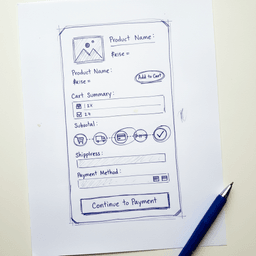
Good ecommerce development turns browsing into buying. That happens through clear product pages, fast mobile UX, and a checkout that does not annoy people.
Mobile-first is not optional
Most shoppers will meet your brand on a phone first.
In 2025, mobile commerce is projected to reach about $4 trillion, around 59% of online retail sales. If your mobile experience is clunky, you are pushing customers away before they even see your product.
- Thumb-friendly navigation: buttons, menus, and form fields must be easy to tap.
- Readable text: product details should be easy to scan, not a wall of tiny words.
- Fast loading: large images and heavy apps punish mobile users with slow pages.
Product pages that answer questions fast
Your product page is your salesperson. It needs to build confidence without a live chat rep standing there.
- Great photos and video: show angles, scale, and real use.
- Clear descriptions: explain benefits, not only specs.
- Reviews and ratings: almost 95% of shoppers read reviews before buying.
- Obvious CTA: “Add to cart” should stand out and be easy to reach on mobile.
Checkout is where sales go to die
Cart abandonment is often self-inflicted. Founders add too many steps, too many fields, and surprise costs at the end.
A good checkout feels short. A bad checkout feels like work.
We once worked with a client whose checkout asked for 12 fields. By trimming it to 7 and adding express payments like Apple Pay, we increased checkout completion by 18%.
Here’s what to focus on:
- Guest checkout by default: let users buy without creating an account.
- Autofill support: speed up address and payment entry.
- Clear progress steps: people should know how close they are to done.
- Upfront pricing: show shipping and taxes as early as you can.
If you want a practical way to find friction fast, this web usability testing guide lays out a simple approach you can run before and after launch.
SEO, security, and speed: the “invisible” foundations
Design is what founders talk about. The foundations are what customers feel.
If people cannot find you, do not trust you, or get tired of waiting for pages to load, your store will struggle even with a great product.
SEO basics for ecommerce
Paid ads can work, but they get expensive fast. SEO is what helps you show up when people search for the exact products you sell.
Start with structure. Categories and collections should make sense to humans and to search engines.
Then handle the product page basics:
- Unique, descriptive titles: not “T-Shirt,” but “Men’s Organic Cotton Crewneck T-Shirt, Navy.”
- Strong meta descriptions: a short pitch that matches search intent.
- Clean URLs:
/mens-cotton-tshirt-navybeats/product?id=123.
Security that earns trust
Shoppers will not enter card details on a site that feels unsafe.
Start with SSL (the padlock icon and https). Not having SSL is a major red flag for many shoppers.
Also use well-known payment options. Providers like Stripe, PayPal, and Shopify Payments help reduce risk by handling sensitive payment steps and industry compliance requirements.
Security is part of your brand. If customers do not feel safe, they do not buy.
Speed that protects conversion
Speed affects everything. It impacts SEO, paid ad performance, and conversion rate.
Many studies show that a 1-second delay can reduce conversions by around 7%. On a $100,000/year store, that can mean $7,000 lost from a single second.
Common fixes include:
- Compressing images: this is often the biggest win.
- Using a CDN: faster load times for shoppers in different locations.
- Cutting apps and plugins: every extra add-on can slow pages and break things.
- Paying for good hosting: cheap hosting costs more later in lost sales.
If you want help improving speed and conversion after launch, our website optimization services focus on measurable changes, not redesigns for the sake of it.
Costs and timelines: what founders should expect
Founders always ask two questions: “How much will this cost?” and “How long will it take?”
The honest answer is: it depends on complexity, integrations, and how custom you want things to be. Still, you can plan with real ranges.
This is also why we offer a money-back guarantee on our strategy phase. A clear plan early can prevent months of rework.
Typical ecommerce build cost ranges
-
Basic hosted store (Shopify): A pre-made theme with light customization often costs $3,000 to $10,000. Timeline is usually 4 to 8 weeks. Ongoing costs include your Shopify plan ($39 to $399) plus apps.
-
Customized self-hosted store (WooCommerce): Expect $15,000 to $40,000+ depending on design, custom features, and integrations. Timeline is often 3 to 6 months. Ongoing costs include hosting, maintenance, and plugin licenses.
-
Custom or headless build: Often starts around $50,000 and can go well into six figures. Timeline is commonly 6 to 12 months+.
Custom features are the biggest cost driver. Every special workflow, integration, and design revision adds time and budget.
One-time vs ongoing expenses
Many budgets cover launch, then get crushed by monthly reality. Plan for both.
| Expense type | Description and examples |
|---|---|
| One-time costs | Strategy, design, development, setup, data import, and launch support. |
| Ongoing costs | Platform subscriptions, hosting, app/plugin fees, payment processing fees, and maintenance support. |
Your store is software. If you do not maintain it, it becomes harder and more expensive to change later.
When to hire an ecommerce development partner
You can build a store yourself. Many founders do.
The bigger question is whether that is the best use of your time. Every hour spent debugging a plugin is an hour not spent on marketing, partnerships, and customer research.
Signs you need help
- Your vision does not fit the template: you need custom product builders, subscriptions, bundling rules, or unique workflows.
- You need complex integrations: ERP, 3PL, custom CRM, analytics pipelines, or multi-store inventory syncing.
- Small changes take forever: a “simple tweak” turns into days of troubleshooting and broken layouts.
At that point, the goal shifts. You are not just getting a store online. You are building a business asset that can grow with you.
What a good partner actually does
A real partner is not just a pair of hands. They help you make better decisions.
Our work starts with a paid strategy phase. We map your goals, customer journey, and operations before development starts. If you do not feel the strategy phase delivered value, we offer a money-back guarantee.
Next steps
If you want to move from founder-led fixes to a store you can trust, start with these three actions:
- Track your time for one week: how many hours go to tech problems versus growth work?
- List your top bottlenecks: what can’t your site do today that you need for the next stage?
- Talk to a team that starts with goals: the right partner asks about your business before recommending tools.
When you’re ready to build or improve a store with a clear plan and strong execution, reach out through our contact page.


