


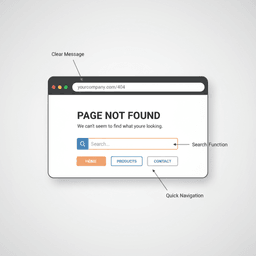
Someone clicks a link to your site, sees a “Page Not Found” message, and leaves. That one moment can erase the trust you worked hard to earn. If you design 404 page experiences with real users in mind, you can turn that dead end into a helpful detour that keeps people browsing, signing up, and buying.
A 404 page feels like a tiny detail. In practice, it can be a quiet leak in your funnel. When it’s generic or confusing, visitors bounce. When it’s clear, fast, and on-brand, it can guide them back to the right place and protect your SEO.
Why Your 404 Page Is Quietly Costing You Customers
Most founders spend time on the homepage, pricing page, and signup flow. Almost nobody reviews the 404 page until something breaks. That is the problem. People do land there, and they often land there at the worst time, right after an ad click, a shared link, or a search result.
When someone hits an unhelpful error page, the path is predictable. Confusion turns into frustration. Then they hit the back button. This is not “just a technical issue.” It is a gap in your customer experience.
The hidden costs of a bad 404 page
When users feel stuck, they leave. That drives up exits and sends a bad behavior signal. If visitors return to Google right away, it can hurt how your pages perform in search over time.
This adds up fast on mobile. If your 404 page is slow, hard to read, or missing clear next steps, you lose the visitor in seconds.
A bad 404 page feels like a slammed door. A good one feels like a person saying, “No worries, here’s where you should go.”
This is the kind of “small page, big impact” issue we often catch during a site review. If you want a checklist for spotting problems like this, start with our website audit guide for founders.
From problem to opportunity
You can treat a 404 as a dead end, or you can treat it like an unexpected landing page. A smart 404 page can:
- Point to the right places with a few high-value links.
- Help users self-serve with a search bar.
- Sound like your brand so it still feels like your product.
That small shift keeps people on your site longer, lowers exits, and saves more sessions than you would expect.
The Anatomy of a 404 Page That Actually Helps
A good 404 page is not about flashy tricks. It is about clarity. Think of it like a helpful concierge. The visitor is lost, and your job is to get them back on track fast.
Start with a human message
Explain what happened in plain language. Skip scary jargon like “HTTP status code.” People do not care. They just want to know they are not doing something wrong.
Keep it short. A simple line like “We can’t find that page” works. If your brand voice is playful, you can add a light touch. If your brand is serious, stay direct.
What to include on the page
These are the building blocks that make a 404 page useful.
| Component | Why it matters | Founder tip |
|---|---|---|
| Clear message | Cuts confusion and lowers stress. | Use one or two short sentences. |
| Search bar | Lets users find what they wanted. | Make it the main action on the page. |
| Key links | Gives fast “escape routes” to valuable pages. | Limit to 3–5 links to avoid choice overload. |
| Consistent layout | Keeps trust by looking like the rest of the site. | Reuse your header, footer, and styles. |
Give them a way to find what they need
After the message, lead with a solution. For most sites, that is search. Put it front and center. If your site does not have search today, consider adding a lightweight site search or at least a “popular pages” section.
A 404 page is still a page view. Treat it like it has a job to do, not just an error to report.
Keep navigation simple
Do not dump your full sitemap on a frustrated visitor. Give a few strong options that match your main funnel.
- Homepage for a clean reset.
- Product or services so they can see what you offer.
- Pricing or plans if you are a SaaS brand.
- Blog or resources if content drives leads.
- Contact if they need help.
If your site needs broader help with speed, tracking, and conversion fixes like this, our website optimization services are built for small changes that show up in metrics.
Turning Errors Into Brand Opportunities
Once the basics are there, you can do more than apologize. A 404 page can show personality and still be useful. That is where it becomes a brand touchpoint, not a failure screen.
You might feature a top guide, a popular product, or a quick “start here” link. The best version depends on your business model.
Go beyond “Back to homepage”
For ecommerce, a 404 page is a good place to show best sellers or key collections. The visitor has buying intent, they just hit a broken link.
For SaaS, link to the demo, free trial, or a case study that proves value. If the missing page was part of an ad campaign, include a link that matches that ad’s promise.
They arrived by mistake, but they are still on your site. Give them a better next step than the back button.
If you are also working on the look and feel of your site, our strategic branding and design work helps teams build systems that stay consistent, even on edge-case pages like 404s.
Creative ideas that can keep people engaged
- Show your best content: Link to 3–5 posts that bring in leads.
- Add a short video: A quick “what we do” clip can help, but only if it loads fast and stays focused.
- Use social proof: A short testimonial can build trust in one sentence.
- Add light personality: A small illustration or friendly line can reduce frustration.
- Offer a small incentive: A one-time code can work for ecommerce, if it fits your margins.
Keep these extras secondary. The primary goal is still helping users find what they came for.
How to Get a Custom 404 Page Live (Without Developer Confusion)
Good design only matters if it ships. Many founders get stuck here because they do not know how to describe what they want in technical terms.
What to ask your developer for
The phrase you want is “custom 404 template.” That is the page your server shows when a URL is missing.
Here are clear requests your team can act on:
- For WordPress: “Please create or update the
404.phptemplate in our theme. It should use our normal header and footer, plus the new message, search bar, and links.” - For Shopify: “Please update
templates/404.jsonin our theme. Add our message, a search option, and links to our top collections.” - For Next.js: “Please add a
not-found.jsfile (or the framework’s 404 route) and match our app styles. Include search or key routes back to core pages.”
If you need a partner who can implement this cleanly across templates, tracking, and performance, this is the kind of detail our website development team handles all the time.
Fix broken links first
A great 404 page is a safety net. Your real goal is that fewer people see it.
Start with Google Search Console. It reports URLs Google tried to crawl that returned “Not found (404).” Export that list, then fix the cause.
Treat broken links like basic maintenance. Fixing them improves user trust and shows search engines your site is cared for.
Set up 301 redirects the right way
When a page is gone for good, a 301 redirect tells browsers and search engines where it moved. This helps preserve rankings and inbound links.
- Export “Not found (404)” URLs from Search Console.
- Match each old URL to the closest relevant live page.
- Add 301 redirects in your platform, host, or app config.
If there is no relevant replacement, let it land on your custom 404 page. Just make sure that page gives a clear next step.
How to Measure If Your 404 Page Is Working
Launching your new 404 page is not the finish line. The win is fewer exits and more “recoveries,” meaning users find another page and keep going.
Set up analytics tracking
Use Google Analytics (or any analytics tool you trust) to track what happens on the 404 page. Do not just count views. Track behavior.
- 404 page views to understand how often users hit dead ends.
- Clicks on key links to see if your “escape routes” work.
- Search submissions to learn what users expected to find.
- Exit rate to measure whether the new page keeps people on-site.
Search terms from the 404 page can also tell you what your main navigation is missing. If many users search for “pricing,” add a pricing link to your header, not just your 404 page.
Watch for patterns you can act on
Example: if a large share of 404 searches are for “login,” you may have broken links in email campaigns. If users keep looking for a page that no longer exists, redirect it or publish a new page that answers the same need.
Your 404 page data is feedback from your most confused users. It is blunt, and it is valuable.
Why this shows up in real business metrics
Less frustration means longer sessions. Longer sessions often mean more signups, more purchases, and better engagement signals. That can also support SEO over time, especially on mobile.
If you are seeing bigger UX issues than just the 404 page, it may be time for a broader fix. Our website redesign services focus on turning “pretty but leaky” sites into sites that support growth.
Your Action Plan for a Better 404 Page
You do not need a full redesign to fix this. You need a simple plan and an hour of focus.
Your next steps (do this today)
- Find your current 404 page: Visit
yourdomain.com/gibberishand see what loads. - Check how often it happens: Look for 404 page views and exits in your analytics.
- Sketch a better version: Message, search, 3–5 links, and consistent branding.
- Pull a broken URL list: Use Google Search Console’s 404 report.
- Assign redirects: Map old URLs to the closest relevant live pages.
If you want to pressure-test your site the same way a real visitor experiences it, our web usability testing guide shows how to spot friction fast and turn it into clear fixes.
FAQs
What’s the real cost of a custom 404 page?
On WordPress or Shopify, a developer can usually ship a custom 404 page in a few hours. In a custom app, it is still a small task compared to the cost of losing high-intent visitors from broken links.
The biggest cost is not building it. It is losing customers when they hit a dead end.
Should our 404 page be funny or serious?
Match your brand voice. Some brands use playful copy and art well, Pixar is a common example. But helpful beats clever every time. If humor gets in the way of finding the right page, skip it.
How often should we check for broken links?
Monthly is a good starting point for most sites. Google Search Console is free and gets you most of what you need. Larger sites may want weekly checks using tools like Ahrefs or SEMrush.
Want a 404 page that keeps visitors moving toward signup, purchase, or contact? If you’re a founder who wants a partner to build and improve the parts of your site that affect revenue, reach out through our project inquiry form.


