


Your app is getting traction. Then one day it starts to feel slow and fragile. Pages load late, new features feel risky, and your data looks harder to trust each week.
That is often the moment teams start asking a simple question: what is a db migration, and do we need one?
Sometimes the fix is small. Other times, the database that got you to your first customers is no longer the right fit. A migration is how you make the next stage of growth possible without breaking what already works.
Think of your first database as a small local library. It works when you have a few hundred “books.” But once you hit a city’s worth of information, the shelves, the catalog, and the checkout line cannot keep up.
This is when database migration shifts from “nice to have” to a real business need. It is not just a technical task. It is how you protect performance, data quality, and your team’s ability to ship.
Not every slowdown means you should move everything. But many business problems map directly to what is happening under the hood. Here are the most common signals.
Signs You Might Need a Database Migration
| Business Problem You’re Experiencing | What’s Likely Happening in Your Database | How a Migration Helps |
|---|---|---|
| Users complain about slow load times or frequent timeouts. | Queries are slow, indexes are missing, or the system cannot handle traffic spikes. | A better-fit database and improved structure can handle more requests and return results faster. |
| Adding simple features takes weeks instead of days. | Your schema is hard to change, or the data model no longer matches the product. | A cleaner schema makes development safer and reduces “surprise” bugs. |
| You can’t get the business insights you need from your data. | Data is inconsistent, scattered, or stored in a way that makes reporting painful. | A new structure or analytics-ready system makes reporting and dashboards easier to trust. |
| Your infrastructure costs keep climbing. | Licensing, maintenance, and scaling for a legacy setup is expensive. | A move to managed or cloud databases can reduce overhead and improve reliability. |
If these sound familiar, a migration is probably on your roadmap. The goal is not “new tech.” The goal is a database that matches your product and your growth plan.
From a Cramped Library to a Modern Warehouse
A good migration turns that cramped library into a clean, organized warehouse. It gives your app room to grow and gives your team a safer place to build.
- Scale with fewer surprises: Better performance under load, even during spikes.
- Ship features faster: A schema that matches the product reduces rework.
- Improve reliability: Fewer timeouts, fewer corrupted records, fewer late-night fire drills.
Also, not every performance problem needs a full move. Many teams start by fixing how the database finds data. If you want a practical example, read our guide on how database indexing works in MySQL.
Understanding What a DB Migration Actually Is
A DB migration is a planned, versioned process for changing a database safely. That change can be a small schema update, a major data move, or both.
It is closer to a controlled construction project than a copy-and-paste job. You plan the steps, test them, run them in order, and confirm that the result matches what you expected.
More Than “Copy the Data”
When people hear “migration,” they often picture exporting data and importing it somewhere else. That can be part of it, but most real migrations include extra work:
- mapping fields and relationships
- cleaning or normalizing messy records
- updating application code to match the new model
- planning downtime or a staged cutover
- building a rollback plan
A DB migration is a business risk project as much as a technical project. The plan matters more than the tools.
If you want help planning a broader move (not just the database), our founder’s guide to platform migration breaks down how to reduce risk and keep your business running.
Changing the Blueprint vs. Rearranging the Furniture
Not all database migrations are the same. Most fall into two buckets. Knowing which one you are doing makes planning much easier.
Schema Migrations: Changing the Blueprint
A schema migration changes the structure of your database. The data usually stays put, but the “shape” of it changes.
Examples include adding a column, splitting a table, adding a new relationship, or changing a constraint. These updates often happen during normal product work.
For example, if you want to highlight authors more, you may add an author_bio field and a profile_picture_url column. The user records are still the same users. The schema now has room for the new feature.
Data Migrations: Moving the Data Itself
A data migration moves records from one place to another, often between different database systems. This includes moves like MySQL to PostgreSQL, on-prem to cloud, or multiple databases into one warehouse.
This is a bigger project because you are moving the full dataset, not just changing table definitions.
- Legacy to modern: replacing a hard-to-maintain database with a managed cloud option
- Platform switches: moving customer and subscription data between systems
- Consolidation: merging multiple sources into one reporting store
Schema migrations change what you can store. Data migrations change where you store it.
Choosing Your Migration Approach and Its Tradeoffs
Once you know what kind of migration you are running, the next question is about disruption. Will the app go offline? Or do you need to keep it running the whole time?
This is where planning often gets real for founders. The “right” answer depends on revenue risk, traffic patterns, and how much complexity your team can handle.
The Big Bang Approach: Scheduled Downtime
A Big Bang migration happens in one planned maintenance window. You take the app offline, run the migration, verify results, then bring the app back.
This approach is simpler and usually faster. It can also be the cheapest path, because you are not running two systems in parallel.
The downside is obvious. If the migration runs long or fails, your app stays down longer.
The Trickle Approach: Zero-Downtime
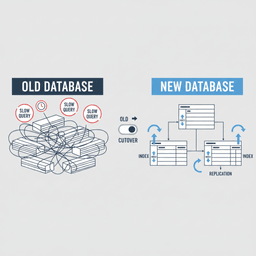
A zero-downtime migration keeps the app online while you move. This usually means running old and new systems together, syncing changes between them, and shifting traffic in stages.
It is more work. It also lowers business risk for systems that cannot afford an outage.
Migration Approach Comparison: Big Bang vs. Zero-Downtime
| Factor | Big Bang Migration (Scheduled Downtime) | Zero-Downtime Migration (Trickle) |
|---|---|---|
| User Impact | High. The app is offline during the window. | Low. Users continue using the app. |
| Risk | Higher. Problems can extend downtime. | Lower. You can test with live-like data and roll back more safely. |
| Complexity & Cost | Lower. Fewer moving parts. | Higher. Sync, dual writes, and staged cutover add work. |
| Duration | Shorter. Done in one window. | Longer. Often days or weeks. |
| Best For | Internal tools, low-traffic apps, or systems where downtime is acceptable. | Ecommerce, SaaS, and any product where uptime protects revenue and trust. |
Many teams also use proven tools to manage schema changes and data moves, such as AWS DMS, Flyway, and Liquibase. The tool matters, but it does not replace planning, testing, and good rollback paths.
If you need help building or executing this work, our website development services cover migrations, integrations, and the engineering work needed to keep a growing product stable.
The Real Risks of Database Migration
Migrations fail for predictable reasons. The scary stories usually share the same root causes: rushed planning, weak testing, and no clear rollback.
The main risks to plan for are simple to list, even if they can be hard to solve:
- Data loss: records do not copy over, or deletes happen by mistake.
- Data corruption: fields map wrong, types change, or relationships break.
- Downtime: the migration takes longer than expected.
- Performance regressions: the new system is “correct” but slower for real traffic.
- Security and access issues: roles, credentials, and network rules change.
A Cautionary Tale
A founder once tried to run a migration in-house to save money. They ended up with mismatched user records, where subscription data pointed to the wrong accounts.
Support tickets spiked, revenue reports became unreliable, and the cleanup took days. The issue was not the database. It was the lack of mapping, validation, and rollback planning.
The goal is not just to move data. The goal is to move it correctly, confirm it, and protect the business while you do it.
Turning Risk Into a Plan
You can reduce most migration risk with a short list of habits. Treat these like a pre-flight checklist.
- Create full backups: verify them and practice restoring them.
- Run a staging trial: do a full rehearsal on production-like infrastructure.
- Validate the result: use scripts to compare counts, checksums, and key records.
- Write a rollback plan: document steps, owners, and the “go/no-go” decision point.
Large migrations often include more than the database. They include content, users, payments, analytics, and third-party integrations. If you are planning that kind of move, our founder’s guide to platform migration can help you frame it in plain language.
Your High-Level Migration Checklist
This checklist is for founders and product owners. It helps you lead the conversation, even if you are not the person writing the scripts.
1) Define the Business “Why”
Start with the problem that shows up in metrics. A migration is expensive, so the reason needs to be clear.
- Are slow pages reducing conversion?
- Are feature launches blocked by the current data model?
- Are database costs growing faster than revenue?
A strong “why” sounds like: “Checkout latency increased and cart abandonment rose 15% last quarter.”
2) Audit Your Data
You cannot move what you do not understand. Get a basic inventory of your tables, data sources, and known messes.
Ask simple questions: Do we have duplicate users? Are key fields missing? Are there old records that should be archived or removed?
3) Define Success in Numbers
“Faster” is not a success metric. Choose targets your team can measure.
- response times (example: under 500ms for core pages)
- error rate during peak traffic
- report accuracy (example: revenue totals match source of truth)
If you want a planning template, use our in-depth pre-migration checklist to capture the “before” state and reduce surprises.
4) Decide What Downtime You Can Tolerate
Be honest about your business. Some products can schedule a maintenance window. Others cannot.
This single answer often decides your approach, your timeline, and your budget.
5) Bring in Experience When the Blast Radius Is Big
If this migration touches revenue, customer accounts, or core workflows, it is worth getting support. Experience matters most when the data model is messy or the cutover has to happen without downtime.
For example, a large content archive migration has different risks than a small schema update. A complex rebuild like legacy platform rebuild and migration can include many systems that must move together.
A Few Common Questions About DB Migrations
How long does a database migration take?
It depends on data size, complexity, and the approach. A small schema change can take hours. A full system move with testing and staged cutover can take weeks or months.
The timeline usually becomes clear after a discovery and planning phase, once you know the real data shape and the real dependencies.
Can I lose data during a migration?
Yes, but it is usually preventable. Backups, staging trials, validation scripts, and a tested rollback plan reduce this risk a lot.
Most data loss happens when teams skip validation or rush mapping between old fields and new ones.
Do I need a migration or a tune-up?
A tune-up can help if the system is mostly right and you are seeing slow queries, missing indexes, or poor query patterns.
A migration is more likely if you are blocked on features, you cannot trust reporting, or the database technology is the wrong fit for your traffic and data volume.
What does a database migration cost?
Cost is mainly engineering time. It depends on how much data you have, how messy it is, how different the new system is, and whether you need zero downtime.
A good plan reduces cost by avoiding rework and downtime surprises. It also lets you compare options before committing to the hardest path.
Conclusion
A database migration is not about chasing new tools. It is about keeping your product fast, reliable, and ready for what you want to build next.
If you are seeing slow performance, rising costs, or a data model that keeps slowing your team down, it may be time to plan the move. If you want a second set of eyes, talk with our team. We’ll help you map the safest path before any data changes.


