---
title: "Shopify Speed Optimization: A Real Playbook"
source: https://refact.co/insights/ecommerce/shopify-speed-optimization
author: "Masoud Golchin"
date: "2026-08-29"
---
# Shopify Speed Optimization: A Real Playbook
Your Shopify homepage achieves a score of 95 in Lighthouse. Your product page fails to close the sale. Treating Shopify speed optimization as a score project is the primary issue that leads to this disconnect. Real customers arrive at product URLs from Google Shopping, paid social, or email. Each of these pages has distinct images, apps, review widgets, and marketing scripts that do not appear on the homepage that they never visit. The score indicates that the homepage is optimized. Meanwhile, your revenue is lost on the money page.
In addition to Lighthouse, Shopify has begun to report real-user data for Largest Contentful Paint (LCP), Interaction to Next Paint (INP), and Cumulative Layout Shift (CLS) for the 75th percentile of visits. The good-experience targets for LCP are set to 2.5 seconds, for INP to 200 ms, and for CLS to 0.1, as described in [Shopify’s Web Performance Reports](https://help.shopify.com/en/manual/online-store/web-performance/web-performance-reports). These numbers reflect what your customers experience.
This guide is for merchants and operators who want a more defined hierarchical plan of action. Begin with the profit-generating pages. Use field data before lab data. Address the app and image problems that contribute the most before undertaking a rebuild.
## Why Your Homepage Score Is Lying to You
Lighthouse performs a single sample under a controlled condition. This sample does not reflect every template, device, network, or app state your customers encounter. The product page almost always has a gallery, variant picker, reviews and recommendations, recommender logic, sticky add-to-cart functionality, and the last quarter’s growth team marketing scripts. The homepage rarely has all of this present.
The homepage also loads quicker, likely due to a warmer cache and simplified layout. A product page hits a more complex request chain, so the store looks fast in a lab and feels slow in a taxi.
> **Practical rule:** Start with the slowest money-making page and not the prettiest page in the performance test.
### Measure the pages shoppers actually use
Shopify’s admin now breaks performance by page type and URL. Use that before you consider opening the code editor. Check the home, collection, product, and cart pages. Don’t consider the storefront as a single blob.
- **Product pages:** The revenue templates. Ads, search, and social usually land here.
- **Collection pages:** Slow filtering, heavy grids, and app widgets can quietly kill browsing.
- **Cart pages:** Drawers, recommendations, shipping tools, and tracking pixels stack up right before checkout.
- **Campaign templates:** A one-off landing page can carry an entirely different script load than your standard templates.
The most common issue encountered in the wild is not a bug in the platform. It is third-party apps that load globally even though the functionality only needs to run on a single template. Presidio’s guide on [how to remove third-party app bloat](https://presidiodev.com/blog/shopify-performance-optimization) can serve as a good reference for that kind of audit.
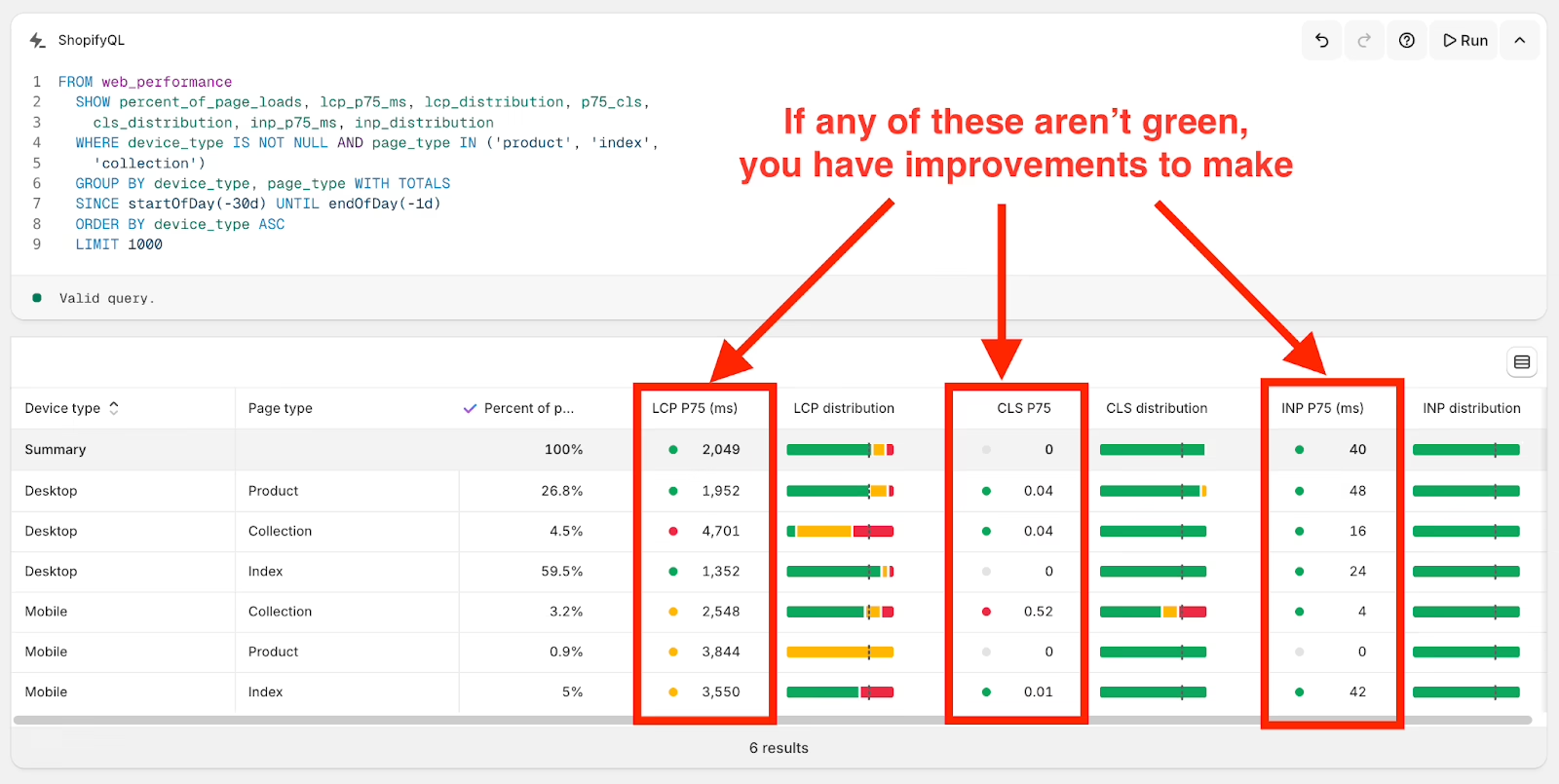
Shopify’s detailed performance reports reveal Core Web Vitals like LCP, CLS, and INP broken down by page type, empowering merchants to prioritize optimizations beyond a single homepage score. · Source: performance.shopify.com
## Measuring Speed the Way Google and Shopify Do
You need both field data and lab data because they answer different questions. Field data tells you the experience of real shoppers from last week. Lab data tells you the reasons a particular URL is slow and how to fix it. If you rely on lab data only, you optimize for a robot. If you rely on field data only, you cannot debug.
According to Shopify, values pertain to the 75th percentile (p75) where the performance metric is better or equal to the reported value for 75% of visits. LCP is the time it takes for the main content of the page to load. INP is the time it takes to respond to actions performed during the visit. CLS is a measurement of how much the design of a page shifts during loading. Shopify opted to use INP instead of FID (First Input Delay) because capturing the time of the first user input during a session is a poor indication of how users perceive the rest of the session.
Google Chrome User Experience Report (CrUX) allows you to retrieve real-world origin-level data measuring user experience from actual Chrome users. The page-type reporting from Shopify is better suited to prioritization for CMS templating since it indicates which page needs to be opened first.
### Give each tool one job
- **Shopify Web Performance Reports:** Rank fixes by page type and revenue.
- **CrUX:** Sanity-check real-user performance for the origin.
- **PageSpeed Insights and Lighthouse:** Debug a specific product, collection, or cart URL.
- **RUM tools like SpeedCurve, Treo, or DebugBear:** Catch regressions after releases and app installs.
For mobile testing, throttle CPU and simulate a 3G network, and not just an emulated wifi connection. Long JavaScript tasks commonly performed by mid-range mobile devices will be masked by a clean desktop run.
| Tool | Data Type | Granularity | Best For |
| --- | --- | --- | --- |
| Shopify Web Performance Reports | Field | Page type and URL | Prioritizing revenue templates |
| CrUX | Field | Origin level | Storefront-wide health |
| Lighthouse | Lab | Individual URL | Debugging specific pages |
| PageSpeed Insights | Lab plus field where available | URL and origin | Combining diagnosis with user data |
| SpeedCurve, Treo, DebugBear | Field and lab | Template and release | Monitoring regressions |
The outputs should be brief: a ranked list of 2 – 3 revenue templates that do not meet the p75 metrics, and a list of scripts, apps, or images that appear to be the offending party. Shopify’s own [web performance improvement guide](https://help.shopify.com/en/manual/online-store/web-performance/improving-web-performance) provides more insightful information on the topics of requests, caching, and lazy loading.
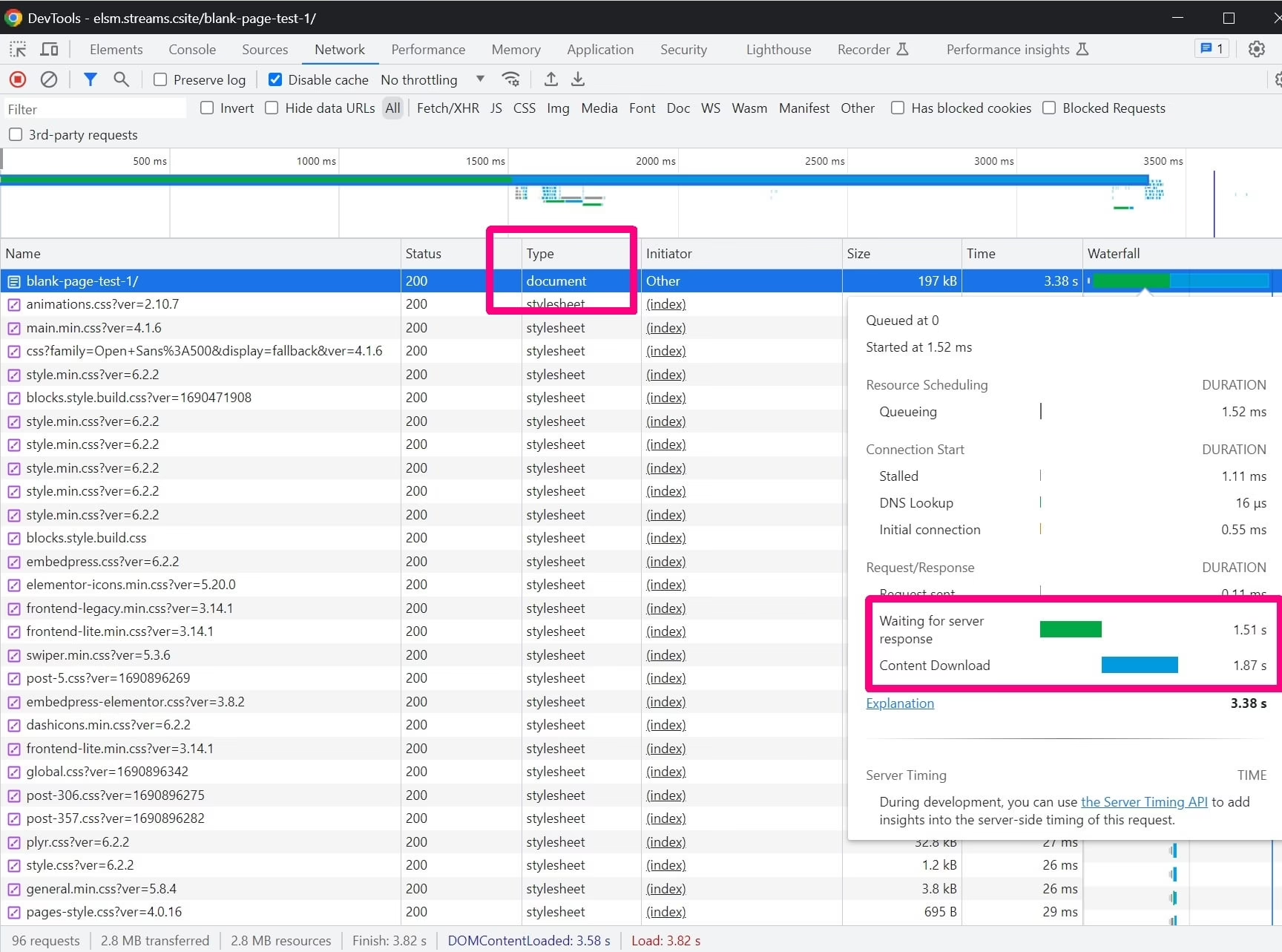
Easily pinpoint external scripts that impact page load by filtering third-party requests in the Chrome DevTools Network panel’s detailed waterfall view. · Source: www.reddit.com
## The Five Usual Suspects Behind a Slow Store
Slow Shopify stores rarely have a single large cause. Instead, they have many smaller causes. Amongst other things, practitioner discussions on X in recent years mentioned two common causes: oversized images and app overload. The direction of travel was confirmed by Shopify’s platform team in August of 2023, when they rolled out automatic Early Hints. Early Hints lead to an improvement of 76 ms on First Contentful Paint and 100 ms on LCP, respectively, with zero merchant effort. Therefore, the biggest issues that remain for you are the ones Shopify cannot address from their side – the media you upload and the apps you use.
### Start with the expensive work
When a page looks visually complete, but feels laggy, third-party apps and marketing scripts should be your first priority. Many of these apps, including reviews, chat, upsells, analytics, loyalty, and personalization, usually load JavaScript on every template when, in reality, these features are only visible on one. This competes for network requests and blocks the main thread, which is what breaks INP. Shopify advises on [web application performance](https://www.shopify.com/enterprise/blog/web-application-performance) to minimize requests, defer non-critical work and cache aggressively.
The theme will be your next focus. Unused sections, global CSS, large JavaScript bundles, and render-blocking assets affect every template, including the product page. A new theme will not fix this issue if the same app stack continues to inject the same scripts.
**Images still matter** when a product’s primary image is the LCP element. The failing pattern is almost always a 5 MB original image that is uploaded by the merchant and bypasses optimization built into Shopify. The solution can’t be to “compress all images.” Instead, make sure the browser gets the correct image at the correct size with the correct priority based on the requesting device.
**Fonts and CSS** can delay text rendering and cause visible shifts. Reckless use of multiple font families, excessive weights, and last-minute font file loads earn a spotlight too.
**Cart and checkout extensions** may be less obvious sources of trouble. Tracking pixels, custom shipping widgets, upsell offers, and completely replaced cart solutions all add burden at the exact moment the user is trying to complete an order.
| Suspect | Field-Data Symptom | First Check |
| --- | --- | --- |
| Apps and scripts | High INP, long interaction delays | Network panel and long tasks |
| Theme and Liquid | Slow rendering across templates | Rendered HTML, CSS, template assets |
| Product imagery | Poor LCP on product or collection pages | LCP element and image request |
| Fonts and CSS | Late text render, layout movement | Render-blocking requests and font swap |
| Cart and checkout extensions | Lag during cart interaction | Cart waterfall and extension requests |
Poor responsiveness of field data nearly always points to an app rather than the theme. Poor LCP for product pages almost always points to the hero image or other page-specific assets. High CLS points to missing image dimensions and other injected content.
## Prioritized Fixes You Can Ship This Week
When addressing page performance issues, don’t jump to the easiest fix. Instead, address the change that is most likely to have an impact on revenue generation.
Open Chrome DevTools and filter the Network panel by third-party domains. Take note of the unwarranted requests. Then remove unused applications from the Shopify admin. Check the theme for leftover snippets, app embeds, and script tags. This is the most common beginner-level optimization, and where speed freelancers tend to break things the most. Public Stack Overflow posts detail syntax errors in Shopify themes caused by freelancers adding speed optimization scripts and not fully cleaning their work. When in doubt, code review before going live.
For non-critical scripts, use the defer attribute where supported:
Load feature code only on the template where it is required:
{% if template.name == ‘product’ %}{% endif %}
Do not use defer on scripts that support the most important UI interaction (add to cart, variant selection, etc.). This creates a fast page that the user cannot buy from.
### Fix image priority and layout stability
Lazy-loading should not be done on the image that appears above the fold. Everything else can be lazy-loaded.
{{ product.featured\_image | image\_url: width: 900 | image\_tag: loading: ‘lazy’, widths: ‘360, 540, 720, 900’, sizes: ‘(max-width: 768px) 100vw, 50vw’, alt: product.featured\_image.alt }}
The main product image requires an eager load and fetch priority hint, as well as reserved dimensions to avoid layout shift.
 Lazy loading does not solve image weight, as shown on Stack Overflow by many practitioner questions. Even if lazy loading is added, PageSpeed will still flag oversized images because the byte weight remains the same. Along with lazy loading, you need to have proper dimensions, modern formats, and compression.
Liquid loops should be audited, especially ones that appear on every page. CSS should be page-specific when possible. Instead of shipping whatever the theme vendor left in place, use a build tool like esbuild or Rollup to compress theme JavaScript. More information on theme-level cleanup can be found in our guide to [Shopify theme customization](https://refact.co/insights/ecommerce/shopify-theme-customization).
If an app, which you cannot delete, is the cause of the bloat, it is better to replace it with a custom-built feature that will be more cost-effective than purchasing a “speed” app in which more scripts will be added. This tradeoff should be considered before an app is installed. More information on this tradeoff can be found in our guide to [Shopify app development](https://refact.co/insights/ecommerce/shopify-app-development).
| Fix | Typical Gain | Effort |
| --- | --- | --- |
| Remove unused apps and leftover snippets | Often meaningful | Low to medium |
| Defer non-critical scripts | Improves responsiveness | Medium |
| Correct LCP image sizing and priority | Improves product-page LCP | Low |
| Reserve space for media and widgets | Reduces CLS | Low |
| Split page-specific CSS and JavaScript | Reduces unused work | Medium |
Warning: An individual change to Lighthouse is not enough to warrant a conclusion. Test the URL again on the same device and network types, then check on field data a week later. Self-reported leaps in Lighthouse posted to social media (e.g. “Mobile from 56 to 96”) make for nice screenshots, but make for poor evidence, as they lack the methodology and the real-user metrics.
## SSR, Headless, and Shopify Plus Trade-offs
Most Shopify stores should remain on server-rendered Liquid. Shopify’s edge delivers cacheable HTML well, and a clean theme resolves more issues than a new architecture. Headless is a true response to a specific need, not a general improvement.
This assertion is reinforced by the data Shopify captured on Core Web Vitals in 2023. Traditional Liquid storefronts exceeded all three Web Vitals metrics about 59.5% of the time. Hydrogen reached 35%. Other headless frameworks dropped to about 28%. With a well-developed custom frontend, the ceiling is dramatically higher, but with average headless builds, the floor is seriously lower. If the theme is slow, considering headless is addressing the wrong issue.
The benefits of headless become apparent when complex personalization or a unique buying experience is not achievable with the Liquid architecture, or when a frontend needs to be customized or is being constantly tested. It adds a new build pipeline along with a new hosting, deployment, and performance monitoring infrastructure. Shopify Plus expands the options for the checkout and B2B experience, but will not magically improve a slow theme.
### Make the architecture decision from evidence
Prior to accepting any proposal, do the diagnostics. Field data should come first. Then decide whether Liquid, apps, images, or scripts cause the delay. A good partner for a headless engagement should start there, not with a framework preference. The recommendations in [vetting a headless implementation partner](https://www.bridge-global.com/blog/headless-commerce-implementation-partner/) from Bridge Global, and [Shopify headless commerce](https://refact.co/insights/ecommerce/shopify-headless-commerce), provide context for the discussion and the band of GMV where the numbers actually matter.
This recommendation is correct and rather unexciting. Prioritize fixing theme, media, and app issues. Move to headless when you must because of other constraints.
## What This Looks Like in Practice
When we worked with [Broya Living](https://refact.co/work/broya-living), the brief was framed around improving conversion. For them, traffic was not a problem, the conversion pathway was. Shopper speed was one problem, but the better solution was knowing where shoppers were leaving the site and what work we were doing that we could remove from those pages. There were subscription products, variety packs, and a cart drawer that was built to manage recurring orders, all on templates that were doing things that they didn’t need to. We removed that work and rebuilt the product and cart flows based on shopper behavior. This resulted in an increase in conversion that has continued to rise during our five-year relationship. For most similar cases, revenue template data is a better place to start than trying to improve page scores.
## Testing Checklist and Troubleshooting After Launch
Performance work on a theme does not end with a launch. New apps, a marketing campaign or a theme edit may change the request waterfall without anyone noticing during routine browsing.
- **Test the revenue templates:** Mobile Lighthouse on product, collection, and cart pages under throttled network conditions.
- **Check field data on a schedule:** Shopify’s reporting and Search Console Core Web Vitals, not only on launch day.
- **Monitor releases:** SpeedCurve, Treo, or DebugBear to catch regressions.
- **Record changes:** Tag each deployment with a short note about what changed.
- **Keep rollback ready:** Know how to restore the last good theme, disable an offending app, and re-measure.
### Three failures show up repeatedly
An app can add a new script after installation. A previously installed script may return after a theme update from a vendor. A marketing campaign can result in a landing page deployment that carries more weight than any standard template. Instead of presuming the last good state of the configuration holds true after a modification, compare the Network panel and the theme files after the change. Our guide to [continuous performance testing](https://refact.co/insights/digital-product/continuous-performance-testing) explains how to make this a repeatable release process, rather than a burdensome one-off audit.
## When to Bring in a Partner and What to Ask For
A large Liquid refactor, repeated app conflicts, or an architectural change your team cannot own should warrant bringing in a development partner. Start with a fixed-price audit, instead of an open-ended rebuild. The $10,000+ estimates that circulate in the Shopify speed market are anchored to full engagements, not diagnostics. A focused audit should cost less and should tell you whether the bigger engagement is necessary.
Request an audit that provides measured baselines of product, collection, and cart templates. The audit should identify LCP, INP, and CLS metric violations, provide the name and script of the offending assets, and provide an implementation order. Request case studies that provide field data, and not just Lighthouse. Confirm the partner will eliminate excess scripts, apps, and code, implement monitoring prior to release, and facilitate rollbacks after release.
| Tier | Scope | Deliverable | Budget |
| --- | --- | --- | --- |
| Focused audit | Field and lab review of priority templates | Baseline, findings, and action plan | $2,500 to $8,000 |
| Theme optimization | Liquid, assets, scripts, template work | Implemented fixes and validation | $10,000 to $40,000 |
| Headless migration | New frontend and delivery architecture | Migration, testing, and launch support | $50,000+ |
This article provides a deeper selection process for the recruitment of [development partners for Shopify store services](https://refact.co/insights/ecommerce/shopify-store-development-services). It includes the real partner selection questions that differentiate a real partner from a nice PowerPoint rebuild.
---
Nothing on this page is a one-time project. Shopify will continue to ship platform improvements, and your app stack, campaigns, and theme will continue to lose alignment with what you tuned them to last quarter. Consistency beats intensity. The store that checks their revenue templates each month is the fastest. If you have to decide whether the next step is a focused audit, a theme cleanup, or something bigger, that early decision is part of what [Refact’s Shopify practice](https://refact.co/services/shopify) is designed to answer before any code is written.
## FAQ
### What is a good Core Web Vitals target for a Shopify store?
Shopify uses Google's thresholds at the 75th percentile of real visits: LCP at 2.5 seconds or less, INP at 200 milliseconds or less, and CLS at 0.1 or less. These are field targets, meaning 75% of your shoppers should experience values at or below those numbers. A Lighthouse score of 90+ in a lab does not automatically mean you are hitting those p75 field targets.
### Should I trust my Lighthouse score or Shopify's Web Performance Reports?
Trust field data for prioritization and lab data for debugging. Shopify's Web Performance Reports show what real shoppers experienced, broken down by page type and URL, which tells you which template to fix first. Lighthouse then helps you diagnose that specific URL. Field and lab answer different questions, and using either one alone will mislead you.
### Is Shopify Plus faster than standard Shopify?
No, not meaningfully so at the storefront level. Shopify Plus adds checkout extensibility, B2B features, and higher API limits, but it uses the same underlying storefront infrastructure. A bloated theme or heavy app stack will be equally slow on Plus. Choose Plus for checkout customization or B2B, not to buy speed.
### Do I need to go headless to hit good Core Web Vitals?
Almost never as a first step. Shopify's own 2023 data showed traditional Liquid storefronts cleared all three Web Vitals more often than Hydrogen or other headless frameworks, because the average headless build is harder to get right. A clean Liquid theme with disciplined apps and images will outperform most headless builds. Go headless only when personalization, custom buying experiences, or frontend requirements force it.
### How much should a Shopify speed audit cost?
A focused audit that produces a baseline, prioritized findings, and an implementation plan generally lands in the $2,500 to $8,000 range. Quotes above $10,000 usually bundle implementation, which you should only commit to after the audit tells you what actually needs fixing. Avoid open-ended engagements that start with a rebuild before the diagnostic is complete.
Lazy loading does not solve image weight, as shown on Stack Overflow by many practitioner questions. Even if lazy loading is added, PageSpeed will still flag oversized images because the byte weight remains the same. Along with lazy loading, you need to have proper dimensions, modern formats, and compression.
Liquid loops should be audited, especially ones that appear on every page. CSS should be page-specific when possible. Instead of shipping whatever the theme vendor left in place, use a build tool like esbuild or Rollup to compress theme JavaScript. More information on theme-level cleanup can be found in our guide to [Shopify theme customization](https://refact.co/insights/ecommerce/shopify-theme-customization).
If an app, which you cannot delete, is the cause of the bloat, it is better to replace it with a custom-built feature that will be more cost-effective than purchasing a “speed” app in which more scripts will be added. This tradeoff should be considered before an app is installed. More information on this tradeoff can be found in our guide to [Shopify app development](https://refact.co/insights/ecommerce/shopify-app-development).
| Fix | Typical Gain | Effort |
| --- | --- | --- |
| Remove unused apps and leftover snippets | Often meaningful | Low to medium |
| Defer non-critical scripts | Improves responsiveness | Medium |
| Correct LCP image sizing and priority | Improves product-page LCP | Low |
| Reserve space for media and widgets | Reduces CLS | Low |
| Split page-specific CSS and JavaScript | Reduces unused work | Medium |
Warning: An individual change to Lighthouse is not enough to warrant a conclusion. Test the URL again on the same device and network types, then check on field data a week later. Self-reported leaps in Lighthouse posted to social media (e.g. “Mobile from 56 to 96”) make for nice screenshots, but make for poor evidence, as they lack the methodology and the real-user metrics.
## SSR, Headless, and Shopify Plus Trade-offs
Most Shopify stores should remain on server-rendered Liquid. Shopify’s edge delivers cacheable HTML well, and a clean theme resolves more issues than a new architecture. Headless is a true response to a specific need, not a general improvement.
This assertion is reinforced by the data Shopify captured on Core Web Vitals in 2023. Traditional Liquid storefronts exceeded all three Web Vitals metrics about 59.5% of the time. Hydrogen reached 35%. Other headless frameworks dropped to about 28%. With a well-developed custom frontend, the ceiling is dramatically higher, but with average headless builds, the floor is seriously lower. If the theme is slow, considering headless is addressing the wrong issue.
The benefits of headless become apparent when complex personalization or a unique buying experience is not achievable with the Liquid architecture, or when a frontend needs to be customized or is being constantly tested. It adds a new build pipeline along with a new hosting, deployment, and performance monitoring infrastructure. Shopify Plus expands the options for the checkout and B2B experience, but will not magically improve a slow theme.
### Make the architecture decision from evidence
Prior to accepting any proposal, do the diagnostics. Field data should come first. Then decide whether Liquid, apps, images, or scripts cause the delay. A good partner for a headless engagement should start there, not with a framework preference. The recommendations in [vetting a headless implementation partner](https://www.bridge-global.com/blog/headless-commerce-implementation-partner/) from Bridge Global, and [Shopify headless commerce](https://refact.co/insights/ecommerce/shopify-headless-commerce), provide context for the discussion and the band of GMV where the numbers actually matter.
This recommendation is correct and rather unexciting. Prioritize fixing theme, media, and app issues. Move to headless when you must because of other constraints.
## What This Looks Like in Practice
When we worked with [Broya Living](https://refact.co/work/broya-living), the brief was framed around improving conversion. For them, traffic was not a problem, the conversion pathway was. Shopper speed was one problem, but the better solution was knowing where shoppers were leaving the site and what work we were doing that we could remove from those pages. There were subscription products, variety packs, and a cart drawer that was built to manage recurring orders, all on templates that were doing things that they didn’t need to. We removed that work and rebuilt the product and cart flows based on shopper behavior. This resulted in an increase in conversion that has continued to rise during our five-year relationship. For most similar cases, revenue template data is a better place to start than trying to improve page scores.
## Testing Checklist and Troubleshooting After Launch
Performance work on a theme does not end with a launch. New apps, a marketing campaign or a theme edit may change the request waterfall without anyone noticing during routine browsing.
- **Test the revenue templates:** Mobile Lighthouse on product, collection, and cart pages under throttled network conditions.
- **Check field data on a schedule:** Shopify’s reporting and Search Console Core Web Vitals, not only on launch day.
- **Monitor releases:** SpeedCurve, Treo, or DebugBear to catch regressions.
- **Record changes:** Tag each deployment with a short note about what changed.
- **Keep rollback ready:** Know how to restore the last good theme, disable an offending app, and re-measure.
### Three failures show up repeatedly
An app can add a new script after installation. A previously installed script may return after a theme update from a vendor. A marketing campaign can result in a landing page deployment that carries more weight than any standard template. Instead of presuming the last good state of the configuration holds true after a modification, compare the Network panel and the theme files after the change. Our guide to [continuous performance testing](https://refact.co/insights/digital-product/continuous-performance-testing) explains how to make this a repeatable release process, rather than a burdensome one-off audit.
## When to Bring in a Partner and What to Ask For
A large Liquid refactor, repeated app conflicts, or an architectural change your team cannot own should warrant bringing in a development partner. Start with a fixed-price audit, instead of an open-ended rebuild. The $10,000+ estimates that circulate in the Shopify speed market are anchored to full engagements, not diagnostics. A focused audit should cost less and should tell you whether the bigger engagement is necessary.
Request an audit that provides measured baselines of product, collection, and cart templates. The audit should identify LCP, INP, and CLS metric violations, provide the name and script of the offending assets, and provide an implementation order. Request case studies that provide field data, and not just Lighthouse. Confirm the partner will eliminate excess scripts, apps, and code, implement monitoring prior to release, and facilitate rollbacks after release.
| Tier | Scope | Deliverable | Budget |
| --- | --- | --- | --- |
| Focused audit | Field and lab review of priority templates | Baseline, findings, and action plan | $2,500 to $8,000 |
| Theme optimization | Liquid, assets, scripts, template work | Implemented fixes and validation | $10,000 to $40,000 |
| Headless migration | New frontend and delivery architecture | Migration, testing, and launch support | $50,000+ |
This article provides a deeper selection process for the recruitment of [development partners for Shopify store services](https://refact.co/insights/ecommerce/shopify-store-development-services). It includes the real partner selection questions that differentiate a real partner from a nice PowerPoint rebuild.
---
Nothing on this page is a one-time project. Shopify will continue to ship platform improvements, and your app stack, campaigns, and theme will continue to lose alignment with what you tuned them to last quarter. Consistency beats intensity. The store that checks their revenue templates each month is the fastest. If you have to decide whether the next step is a focused audit, a theme cleanup, or something bigger, that early decision is part of what [Refact’s Shopify practice](https://refact.co/services/shopify) is designed to answer before any code is written.
## FAQ
### What is a good Core Web Vitals target for a Shopify store?
Shopify uses Google's thresholds at the 75th percentile of real visits: LCP at 2.5 seconds or less, INP at 200 milliseconds or less, and CLS at 0.1 or less. These are field targets, meaning 75% of your shoppers should experience values at or below those numbers. A Lighthouse score of 90+ in a lab does not automatically mean you are hitting those p75 field targets.
### Should I trust my Lighthouse score or Shopify's Web Performance Reports?
Trust field data for prioritization and lab data for debugging. Shopify's Web Performance Reports show what real shoppers experienced, broken down by page type and URL, which tells you which template to fix first. Lighthouse then helps you diagnose that specific URL. Field and lab answer different questions, and using either one alone will mislead you.
### Is Shopify Plus faster than standard Shopify?
No, not meaningfully so at the storefront level. Shopify Plus adds checkout extensibility, B2B features, and higher API limits, but it uses the same underlying storefront infrastructure. A bloated theme or heavy app stack will be equally slow on Plus. Choose Plus for checkout customization or B2B, not to buy speed.
### Do I need to go headless to hit good Core Web Vitals?
Almost never as a first step. Shopify's own 2023 data showed traditional Liquid storefronts cleared all three Web Vitals more often than Hydrogen or other headless frameworks, because the average headless build is harder to get right. A clean Liquid theme with disciplined apps and images will outperform most headless builds. Go headless only when personalization, custom buying experiences, or frontend requirements force it.
### How much should a Shopify speed audit cost?
A focused audit that produces a baseline, prioritized findings, and an implementation plan generally lands in the $2,500 to $8,000 range. Quotes above $10,000 usually bundle implementation, which you should only commit to after the audit tells you what actually needs fixing. Avoid open-ended engagements that start with a rebuild before the diagnostic is complete.